On Wednesday morning, Dana forwarded a message to Theo with one line on top: Can we do this?
The message came from Steep’s risk team. The risk team protects Steep from fraud: stolen cards, fake accounts, and people who order fifty teas with someone else’s money. They wanted an alert within seconds when one card paid for many orders in a short time. Today, their fraud report came once a night. By morning, a stolen card had already bought a lot of tea.
Theo read the message to Mia. Then he took a napkin from his drawer.
“Real time is easy,” he said, “until a phone goes into a tunnel.”
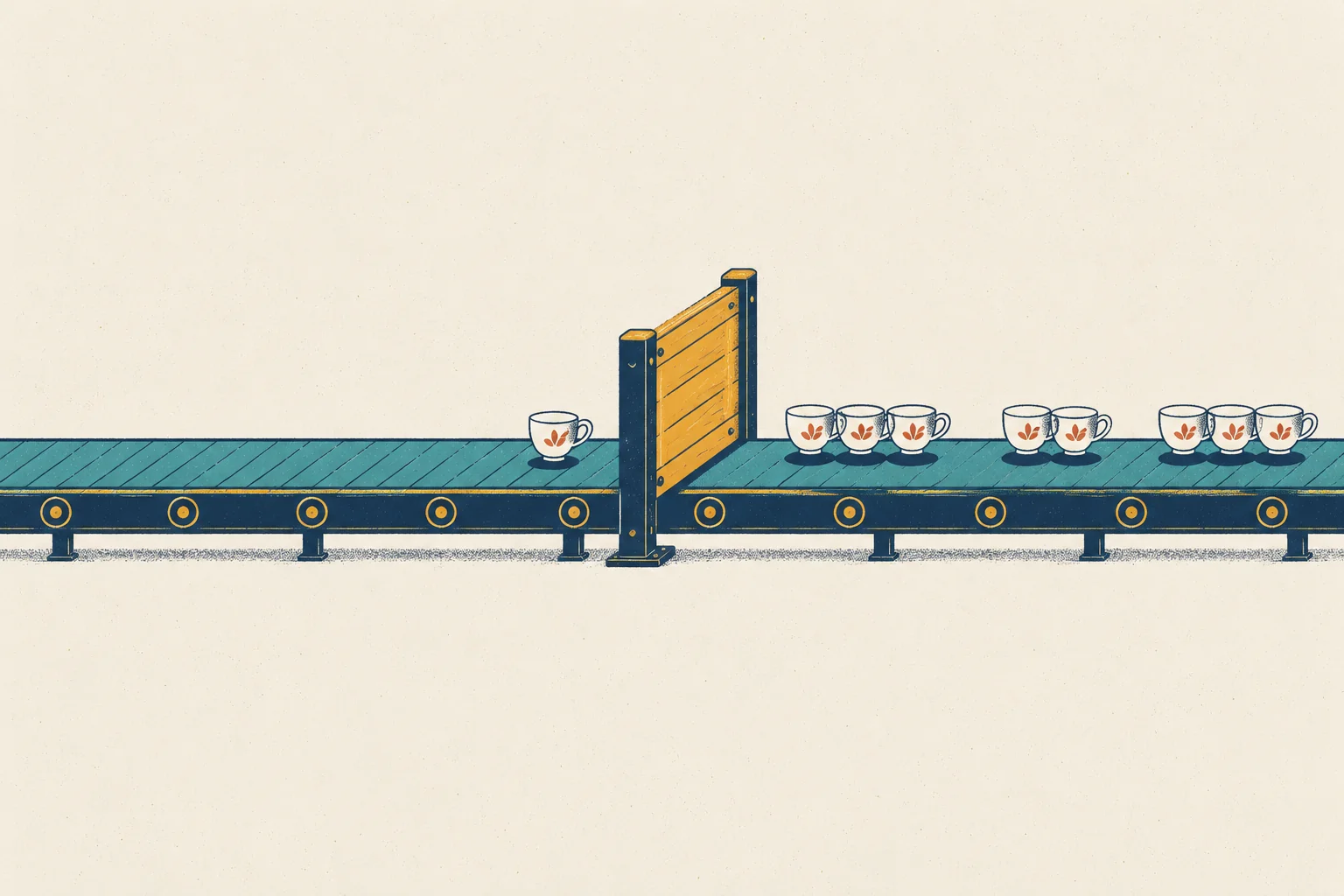
He drew a long belt with small cups on it, and a gate across the belt. “Every tap in the app is a cup. The cups ride the belt to our servers. Every minute, the gate closes, and we count the cups that came through. The risk team wants that count, every minute, all day.”
“And the tunnel?”
“A customer orders in the subway. The phone has no signal, so the app keeps the event and sends it when the train comes out, twenty minutes later. By then, the gate for that minute closed long ago. What do you do with that cup?”
Mia did not answer at once. She was looking at her notebook. In her first week, she had found thousands of orders with no order_completed event. Last Tuesday, Theo had shown her that Kafka did not lose them. But what if the events were not lost at all? What if they were late: stuck on phones in tunnels and elevators, and arriving after everyone had stopped counting?
“Could my missing events be late events?” she asked.
Theo thought about it. “It is worth a test. The gap is only on iOS, and it starts on 7 September, the day a new iOS version came out. A new version can change when the phone sends its events. Say it keeps them and sends them later, all together. Then they would be late, not lost, and only on the new version.” He picked up his pen. “We can measure it. But first you need to know how a stream counts.”
Mia wrote at the top of a new page: Late, or lost?
ImportantThe big idea
In a stream, you must decide how long to wait for late data, and what to do with data that arrives after you stopped waiting.
Look at the picture above. The cups on the right passed the gate in groups. One cup came too late, and the gate is already closed. By the end of this chapter, you will know what the gate is called, how it decides when to close, and what Steep should do with the late cup.
Batch and stream
Everything in Part II so far has been batch processing. A batch job waits until a pile of data is complete, such as yesterday’s partition. Then it processes the whole pile at once (Chapter 13). Batch is simple and exact, but slow: yesterday’s numbers arrive this morning.
Stream processing works the other way round. The job never stops. It reads each event as it arrives, updates its results, and sends them on, often within seconds. The time between something happening and the result being ready is called latency. Stream processing is about low latency.
The data in a stream has no end. New events keep coming for as long as Steep sells tea. Data with a fixed end is called bounded. Data that keeps coming is unbounded.
The program that runs a streaming job is a stream processor. A well-known open-source one is Apache Flink. A Flink job can read from Kafka (Chapter 8), keep running results in memory, and write alerts back to Kafka or to a database. You may also meet two others. Kafka Streams is a library: code that runs inside your own program and reads and writes Kafka topics. Spark Structured Streaming treats a stream as a table that keeps growing and, by default, processes it in small batches, one after another.
The tools differ, but they share the same hard problems. This chapter teaches the problems first, and uses Flink’s names for them.
Two clocks
Every event has two times.
The event time is when the thing happened, on the device that saw it. For a tap in the app, it is the time on the phone. The processing time is the time on the clock of the machine that handles the event, such as a Flink server. If an event happens at 12:01 in the subway and reaches the server at 12:21, its event time is 12:01 and its processing time is 12:21.
The gap between the two is the event’s travel time: how long it took to arrive. Theo measured it for every app event from 1 June to the end of last week, 6,939,550 events in all. He measured arrival at Steep’s servers, which is a little earlier than the moment a Flink job would handle the event. And phone clocks can be wrong, so real pipelines check event times before they trust them.
99.1% arrived within 2 seconds.
0.9% arrived between 5 minutes and about 6 hours late. These were phones without a signal: in a tunnel, an elevator, or a basement.
Almost nothing arrived in between. Web events were never late in this data.
Real streams are rarely this tidy. Most have a smooth tail, from seconds to hours.
Late events also arrive out of order. A tap from 12:01 can arrive after a tap from 12:05. Normal network delays mix the order too, by a few hundred milliseconds. In Steep’s stream, 12.1% of all events arrived after an event that happened later. Remember Chapter 8: a Kafka partition keeps the order in which tickets arrive. If they arrive in the wrong order, the rail keeps the wrong order.
Which clock should a count use? If you count by processing time, the subway order is counted in the minute 12:21. That is the wrong minute, and if you run the job again on the same data, you get a different answer. If you count by event time, the order lands in 12:01, where it belongs. But then you must wait for it. Business counts almost always want event time. So the hard question becomes: how long do you wait?
Cutting a stream into windows
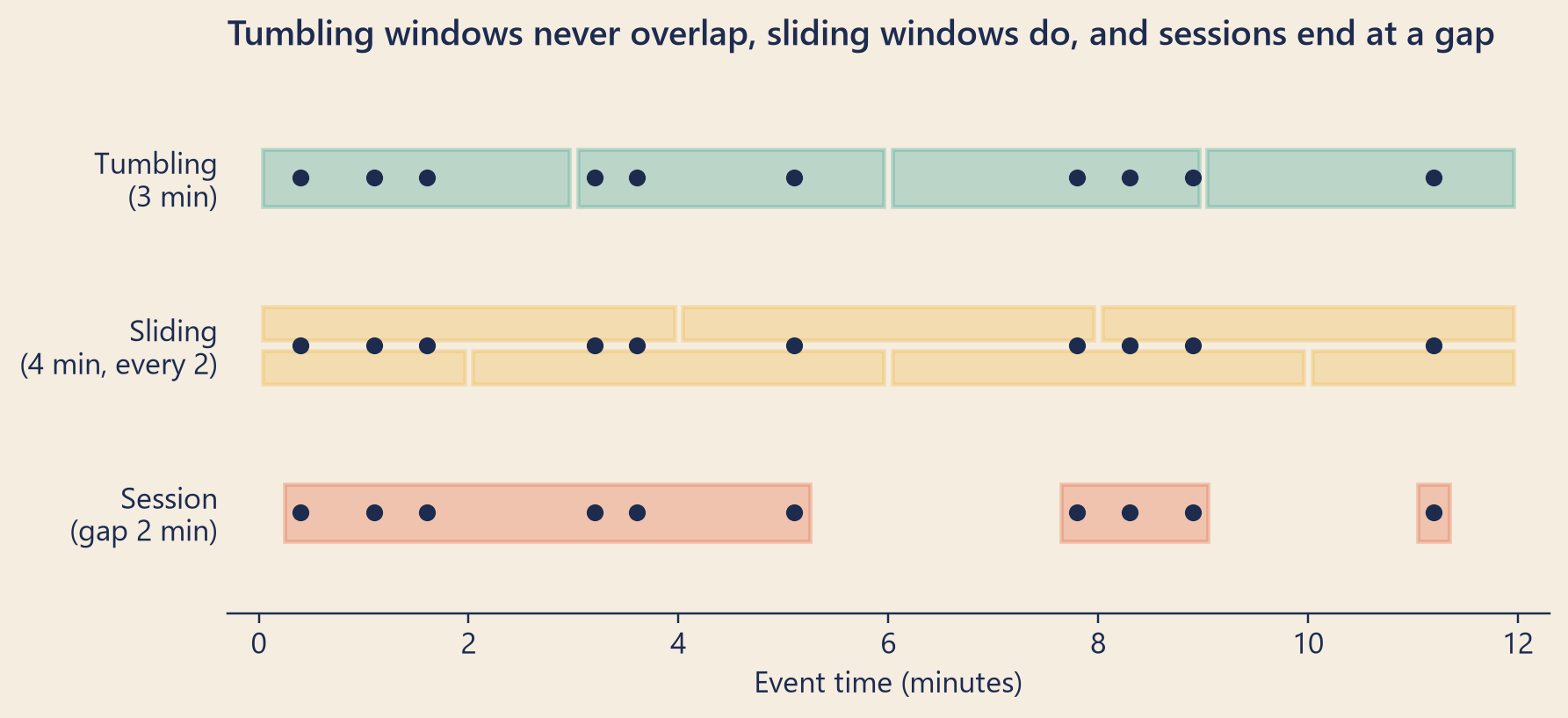
The risk team’s question is: “How many orders did this card pay for in the last minute?” A stream never ends, so “count all the orders” has no answer. Instead, you count inside windows: slices of time. A window collects the events whose time falls inside it, and gives one result for them. Flink offers three common kinds.
A tumbling window has a fixed size and no overlap: 12:00–12:01, then 12:01–12:02, and so on. Every event belongs to exactly one window.
A sliding window has a fixed size, but a new window starts every slide. “Ten minutes, every minute” gives windows that overlap, so one event can belong to several windows.
A session window has no fixed size. It stays open while events keep coming, and closes after a gap with no events, such as 30 minutes. It matches one visit to the app.
Windows are usually keyed: each key gets its own windows. For fraud, the key is the card. For a kitchen screen, it might be the store. (This is the same idea as the Kafka key in Chapter 8.)
Show the code
times = np.array([0.4, 1.1, 1.6, 3.2, 3.6, 5.1, 7.8, 8.3, 8.9, 11.2])bk.setup()fig, ax = plt.subplots(figsize=(8, 3.6), layout="constrained")ax.grid(False)rows = {"Tumbling\n(3 min)": 2.0, "Sliding\n(4 min, every 2)": 1.0, "Session\n(gap 2 min)": 0.0}colors = [bk.TEAL, bk.MUSTARD, bk.TOMATO]def box(x0, x1, y, color, h=0.34): ax.add_patch(plt.Rectangle((x0, y - h /2), x1 - x0, h, facecolor=color, alpha=0.28, edgecolor=color, linewidth=1.5))for start inrange(0, 12, 3): box(start +0.04, start +2.96, rows["Tumbling\n(3 min)"], colors[0])for k, start inenumerate(range(-2, 12, 2)): y = rows["Sliding\n(4 min, every 2)"] + (0.13if k %2else-0.13) box(max(start, 0) +0.04, min(start +4, 12) -0.04, y, colors[1], h=0.2)sessions, current = [], [times[0]]for t in times[1:]:if t - current[-1] >2: sessions.append(current) current = [t]else: current.append(t)sessions.append(current)for s in sessions: box(s[0] -0.15, s[-1] +0.15, rows["Session\n(gap 2 min)"], colors[2])for y in rows.values(): ax.scatter(times, np.full(len(times), y), s=28, color=bk.INK, zorder=3)ax.set_yticks(list(rows.values()), list(rows.keys()))ax.set_xlim(-0.3, 12.3)ax.set_ylim(-0.6, 2.6)ax.set_xlabel("Event time (minutes)")ax.spines["left"].set_visible(False)ax.tick_params(axis="y", length=0)ax.set_title("Tumbling windows never overlap, sliding windows do, and sessions end at a gap")plt.show()
Figure 1: The same ten events (dots) cut into windows in three ways. A toy example with times in minutes.
When is a window finished?
Take the window from 12:00 to 12:01, in event time. On the server’s clock it is now 12:01:00. Is the window finished? Maybe not. An event from 12:00:59 may still be on its way. It may be in a tunnel. It may arrive in five hours.
A stream processor cannot see the future, so it makes a rule. A watermark is a special marker that flows through the stream together with the events. A watermark with time t says: “Event time has reached t. I do not expect any more events with a time at or before t.” When the watermark passes the end of a window, the window fires: it sends its result.
Where does the watermark come from? The most common rule watches the largest event time seen so far and subtracts a fixed watermark delay. If the latest event happened at 12:01:05 and the delay is 2 seconds, the watermark says 12:01:03. The watermark delay is how long you are willing to wait for events that are slow. Flink calls this rule bounded out-of-orderness.
In the picture at the top of this chapter, the watermark is what tells the gate to close. It does not read a clock on the wall. It reads the cups. With a watermark delay of 2 seconds, once a cup from 12:01:02 has come through, the gate for the minute 12:00 can close.
An event that arrives after the watermark has already passed its time is a late event. For a window, that means: the window has already fired when the event arrives.
The watermark delay is a trade-off. A short delay gives fresh results and more late events. A long delay catches more events, but every result waits longer. Theo replayed Steep’s real stream, every event in the order it arrived, through one-minute windows.
Table 1: Steep’s real events from 1 June to 27 September, counted in one-minute windows by event time. For each watermark delay: the share of events that arrive after their window has fired, and the shortest wait for each window’s result.
Watermark delay
Events that arrive late
Each result waits at least
none
0.93%
no extra wait
2 seconds
0.90%
2 seconds
5 minutes
0.89%
5 minutes
1 hour
0.37%
1 hour
3 hours
0.11%
3 hours
6 hours
0.00%
6 hours
Read the table from the top. A delay of 2 seconds leaves 0.90% of events late. Waiting 5 minutes instead gains almost nothing: 0.89%. No event arrives in that gap, as you saw above. (In a stream with a smooth tail, every extra minute of waiting would catch a few more events.) To catch the offline phones, you would have to wait about 6 hours. No fraud alert can wait six hours. So every streaming job needs a plan for the events that come after the gate closes.
What to do with late events
Flink gives you three choices. They can be combined.
Drop them. This is Flink’s default. The window has fired, and a late event is thrown away. The result is fast, and a little too low.
Allow some lateness. You keep each window’s data for an extra period, the allowed lateness. A late event that arrives within that period is added, and the window fires again with a corrected result. Anything that reads the results must accept that a number can change after it was sent. After the extra period, the window’s data is deleted, and later events are dropped.
Send them to a side output. A side output is a second stream next to the main one. Late events go there instead of disappearing. A batch job can read them later and fix the totals.
Theo’s plan for the risk team used a fourth idea: choose a source that is on time. Fraud alerts do not need taps from the app. They need payments. The order service writes every order, with its payment, to Kafka’s orders topic from Steep’s own servers, the moment it happens. A server is never in a tunnel. So the fraud job would read the orders topic, use a short delay of a few seconds, and send the rare late payment to a side output for the nightly report.
Late, or lost?
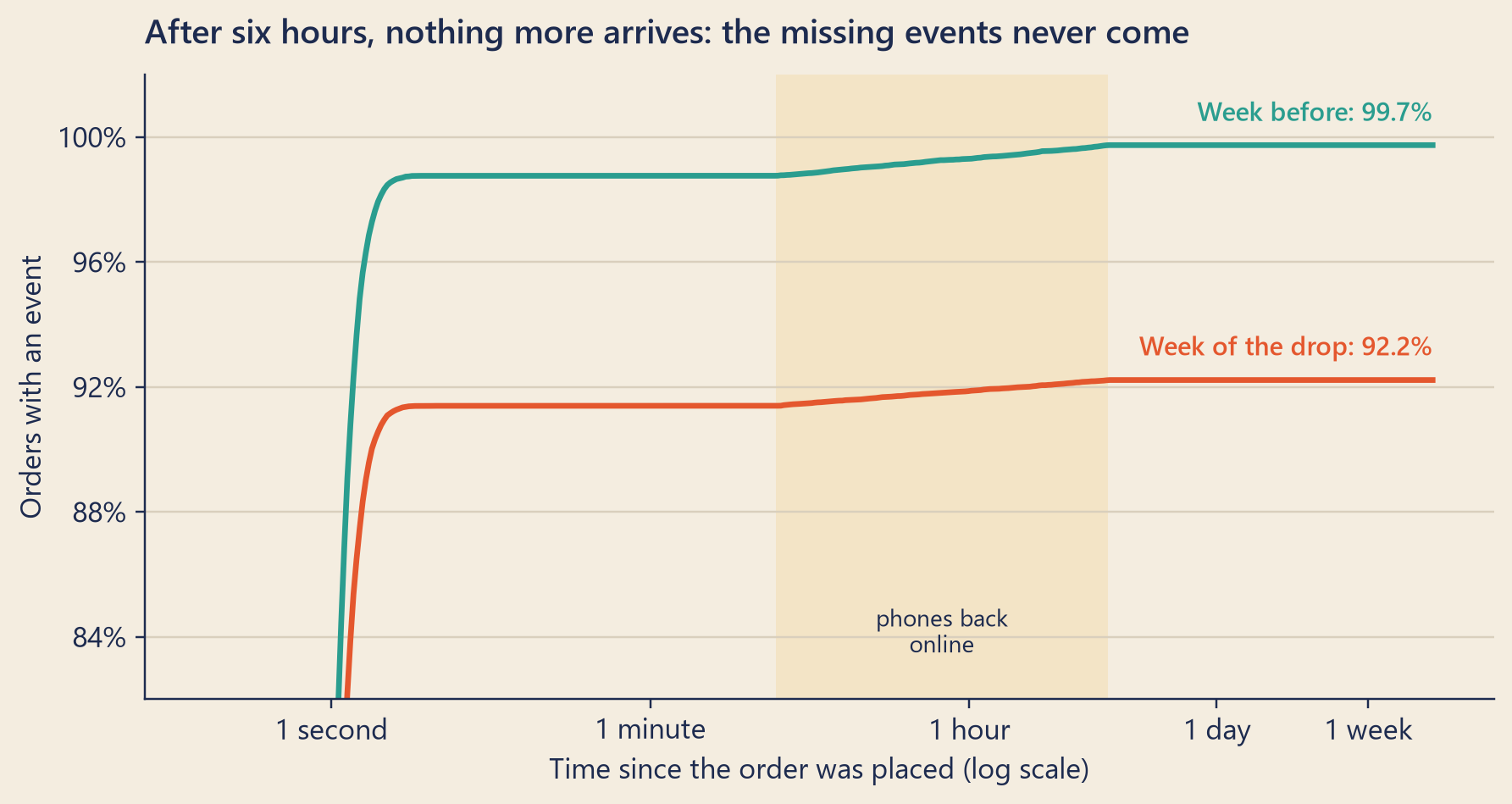
Now Mia’s question. If her missing order_completed events were late, they would arrive in the end. Theo took every order from the week before the drop and from the week of the drop. For each order, he asked: when did its order_completed event arrive, if it ever did? He waited as long as the data allowed: until the end of yesterday, at least 16 days after the last order.
Show the code
grid = np.logspace(np.log10(0.2), np.log10(waited_days * DAY), 400)bk.setup()fig, ax = bk.figure(8, 4.2)for mask, color, label, end in ((in_w1, bk.TEAL, "Week before", w1_ever), (in_w2, bk.TOMATO, "Week of the drop", w2_ever)): w = np.sort(waits.loc[mask, "wait"].dropna().to_numpy()) share = np.searchsorted(w, grid, side="right") / mask.sum() ax.plot(grid, share, color=color, linewidth=2.2) ax.text(grid[-1], end +0.006, f"{label}: {pct(end)}", color=color, ha="right", va="bottom", fontsize=10, fontweight="semibold")ax.set_xscale("log")ticks = [1, MINUTE, HOUR, DAY, 7* DAY]ax.set_xticks(ticks, ["1 second", "1 minute", "1 hour", "1 day", "1 week"])ax.xaxis.set_minor_locator(mticker.NullLocator())ax.axvspan(5* MINUTE, last_late_hours * HOUR, color=bk.MUSTARD, alpha=0.15, linewidth=0)ax.text(np.sqrt(5* MINUTE * last_late_hours * HOUR), 0.835, "phones back\nonline", ha="center", fontsize=9, color=bk.INK)ax.set_ylim(0.82, 1.02)ax.set_yticks([0.84, 0.88, 0.92, 0.96, 1.00])ax.yaxis.set_major_formatter(mticker.PercentFormatter(1, decimals=0))ax.set_xlabel("Time since the order was placed (log scale)")ax.set_ylabel("Orders with an event")ax.set_title("After six hours, nothing more arrives: the missing events never come")plt.show()
Figure 2: Share of orders whose order_completed event has arrived, by time since the order. Data up to 29 September.
The two curves tell the whole story.
In both weeks, most events arrived within seconds: 98.8% and 91.4% of orders within 5 seconds.
Between 5 minutes and about 6 hours, the offline phones came back (the yellow band). In the week of the drop, 370 events arrived this late. They all arrived, and the dashboard counts them. Raw events are stored by the day they arrive (the dt folder of Chapter 9), but the warehouse also keeps the day each event happened, and the dashboard counts every order_completed on that day. Only 13 of these late events arrived after midnight, in the next day’s folder.
After that, both curves are flat, for more than two weeks. The week before the drop stops at 99.7%. The week of the drop stops at 92.2%. 3,483 orders from that week never got an event.
Theo added one more check. Were those phones offline when the order was placed? For 98.8% of the missing orders, the same user’s checkout_start event had arrived within 2 seconds, moments before the order. Those phones were online. The warehouse has their checkout_start, and then nothing more.
“So my events were not late,” said Mia. “They never arrived at all.”
Mia wrote: Late data: ruled out. The phones were online, and the events never arrived.
Remembering: state and checkpoints
To count orders per card per minute, the job must remember the counts between one event and the next. This memory is called state. Flink keeps state for each key, close to the code that uses it: in memory, or on the machine’s local disk.
Machines fail. If a Flink machine dies, its memory is gone. So Flink takes a checkpoint every few seconds or minutes: a copy of all state, saved to safe storage, together with the position in every input. For Kafka, the position is the offset on each partition, like the bookmarks in Chapter 8.
The checkpoint must be consistent: the state and the positions must describe the same moment. Flink does this with checkpoint barriers, special markers that it adds to the input streams. A barrier flows with the events. When it reaches a step of the job, that step saves its state. Every event before the barrier is in the saved state, and no event after it.
When something fails, Flink restarts the job from the latest complete checkpoint. It loads the saved state. Flink keeps its own copy of the Kafka bookmarks inside the checkpoint, and restarts from that copy. Then it reads forward again. A savepoint is a checkpoint that you start by hand, for example before you upgrade the job.
Exactly-once, honestly
After a restart, Flink reads some events a second time: the ones between the checkpoint and the crash. But the state also goes back to the checkpoint, so each of those events changes the state once. This is what Flink means by exactly-once: every event affects the saved state once, even if it was read twice. It does not mean that each event was handled only once.
Results that leave the job are harder. The step that writes a job’s results out, for example to Kafka or to a database, is called a sink. Suppose the job sent a fraud alert, then crashed before the next checkpoint. After the restart, it sends the same alert again.
Flink’s Kafka sink has an exactly-once mode, which is off by default. In that mode, Flink holds its results back and shows them only after each checkpoint is saved. Until then, the results wait inside an open Kafka transaction (Chapter 8). When the checkpoint is saved, Flink commits the transaction: the results become final and visible. If the job crashes first, the transaction is rolled back: its results are thrown away, and the job writes them again after the restart. The price is time: results appear only once per checkpoint. (The box “Under the hood” has the details.)
The other way is an idempotent output (Chapter 13). For example, write each result with a key made of the card and the window. Writing it twice then replaces the same row.
Chapter 8’s limits still hold. Exactly-once inside Flink does not remove a tap that the phone sent twice: that is two events with the same event_id, so remove copies by event_id. And no setting can count an event that was never sent.
One path or two? Lambda and Kappa
Many companies want two things from the same data: fresh numbers now, and exact numbers later. There are two classic designs.
The Lambda architecture runs two paths. A stream path gives fresh but approximate results. A batch path recomputes everything exactly, often overnight, and its results replace the fresh ones. The price is two programs that compute the same metric. They must agree, and over time they drift apart. (Chapter 12 showed what happens when one metric has many definitions.)
The Kappa architecture keeps one path: the stream. To fix a bug or change the logic, you run a new version of the job and replay the old events from Kafka (Chapter 8). The price is that Kafka must keep the events long enough, and a replay of months of data takes time.
Steep landed somewhere between. The fraud alerts would run on the stream. The CEO dashboard would stay in batch, where every number can be checked before Dana sees it. Checking numbers is the subject of the next chapter.
NoteUnder the hood
The watermark rule. With bounded out-of-orderness and a delay \(d\), Flink’s generator computes
\[W = \max(\text{event time seen so far}) - d - 1\ \text{ms},\]
and sends this watermark into the stream at regular intervals. A window from \(s\) to \(e\) contains the times \(s \le t < e\), so its largest timestamp is \(e - 1\) ms. It fires when \(W \ge e - 1\) ms.
Late events. An event for that window is dropped if, when it arrives,
\[e - 1\ \text{ms} + L \le W,\]
where \(L\) is the allowed lateness (0 by default). Flink deletes the window’s state when the watermark passes \(e - 1\ \text{ms} + L\). A long \(L\) means more state to keep.
How Table 1 was made. Theo sorted all events by arrival time, computed \(W\) from the events that arrived before each one, and applied the rule above with \(L = 0\). One simplification: he treated the stream as one line. In a real job, Flink’s Kafka source makes a watermark for each partition, and a step with several inputs uses the smallest of their watermarks. So one partition that goes quiet holds back the whole job. Flink can mark such an input as idle (withIdleness).
Checkpoints in detail. A checkpoint stores, for each source, its position in the stream, and for each step, its state. A step with several inputs waits until the barrier has arrived on all of them before it saves its state. This waiting is called alignment. In Flink’s at-least-once mode, the step does not wait. That is faster, but some events can then be counted twice after a restore. A newer option, unaligned checkpoints, avoids the waiting in another way: it saves the events that are still on their way between steps as part of the checkpoint, and keeps exactly-once.
The two-phase commit. At each checkpoint, every part of the sink puts its results into its open Kafka transaction and records that transaction in the checkpoint (phase one, the pre-commit). When the whole checkpoint is complete, Flink tells every part, and each one commits its transaction (phase two). Readers of the output topic must set isolation.level=read_committed; otherwise they also see results that may still be rolled back.
Transactions and timeouts. The Kafka sink’s default delivery guarantee is NONE. Exactly-once must be chosen (DeliveryGuarantee.EXACTLY_ONCE), and checkpointing must be on. Kafka cancels a transaction that stays open too long, so Flink’s documentation recommends a transaction timeout longer than the longest checkpoint plus the longest restart. Otherwise, a transaction can expire before Flink commits it, and its data is lost.
Try it
The watermark simulator. A toy stream of taps, with time shrunk to seconds. The top line shows when each tap happened (event time). The bottom line shows when it arrived (processing time). A line joins the two. Windows are cut by event time. Each window closes when the watermark passes its end. A tap that arrives after its window has closed is late.
Show the code
watermarkSimulator = {const C = {teal:"#2a9d8f",tomato:"#e4572e",tomatoText:"#b8401c",mustard:"#f2b134",ink:"#1d2b4f",paper:"#f4ede0",grid:"#d9cfbd",muted:"#8a8f9e",white:"#fffdf8"};const SPAN =90;// seconds of event time cut into windowsconst XMAX =120;// seconds shown on both linesconst HORIZON =160;// taps keep coming after the last window, so the watermark keeps movingconst RATE =0.5;// taps per secondconst ALLOWED =15;// allowed lateness, in seconds, for the third choiceconst POLICIES = ["Drop them","Side output",`Allow ${ALLOWED} s of lateness`];const WIDE = {W:720,L:92,R:18,font:12,TOP:34,BOT:150,H:196};const NARROW = {W:360,L:58,R:10,font:11,TOP:34,BOT:210,H:256};let geo = WIDE;// A small seeded random generator (mulberry32), so a stream can be shown again.const rng = seed => () => { seed = (seed +0x6D2B79F5) |0;let t =Math.imul(seed ^ (seed >>>15),1| seed); t = (t +Math.imul(t ^ (t >>>7),61| t)) ^ t;return ((t ^ (t >>>14)) >>>0) /4294967296; };const sizeIn = Inputs.radio([10,15,30], {value:15,label:"Window size (s)"});const delayIn = Inputs.range([0,30], {step:1,value:2,label:"Watermark delay (s)"});const tunnelIn = Inputs.range([0,40], {step:1,value:10,label:"Phones in a tunnel (%)"});const policyIn = Inputs.radio(POLICIES, {value: POLICIES[0],label:"Late taps"});let seed =81;// a stream that shows every effect; "New stream" moves on// Every tap draws the same four random numbers, so the sliders change only what they control.functionmakeStream() {const r =rng(seed);const taps = [];let t =0;for (;;) { t +=-Math.log(1-r()) / RATE;const network =0.2+2.3*r();// a normal trip: 0.2 to 2.5 sconst coin =r(), tunnel =4+36*r();// offline for 4 to 40 sif (t > HORIZON) break;const offline = coin < tunnelIn.value/100; taps.push({ts: t,arr: t + network + (offline ? tunnel :0), offline}); }return taps; }// Replay the taps in arrival order. The watermark = largest event time seen - delay.functionrun(taps, size, delay, policy) {const allowed = policy === POLICIES[2] ? ALLOWED :0;const windows =Array.from({length: SPAN / size}, (_, k) => ({k,start: k * size,end: (k +1) * size,close:null,first:0,count:0,updates:0}));let maxTs =-Infinity;const fate =newMap();for (const tap of [...taps].sort((a, b) => a.arr- b.arr)) {const wm = maxTs - delay;if (tap.ts< SPAN) {const w = windows[Math.floor(tap.ts/ size)];if (w.close===null) { w.count+=1; fate.set(tap,"on time"); }elseif (w.end+ allowed > wm) { w.count+=1; w.updates+=1; fate.set(tap,"added late"); }else fate.set(tap, policy === POLICIES[1] ?"side output":"dropped"); } maxTs =Math.max(maxTs, tap.ts);for (const w of windows) {if (w.close===null&& maxTs - delay >= w.end) { w.close= tap.arr; w.first= w.count; } } }const inWindows = taps.filter(t => t.ts< SPAN);const late = inWindows.filter(t => fate.get(t) !=="on time").length;const lost = inWindows.filter(t => fate.get(t) ==="dropped").length;const waits = windows.map(w => w.close- w.end);return {windows, fate,n: inWindows.length, late, lost,wait: waits.reduce((a, b) => a + b,0) / waits.length}; }const svgBox = htl.html`<div class="wm-svg"></div>`;const tableBox = htl.html`<div class="wm-table" style="overflow-x:auto"></div>`;const summaryBox = htl.html`<div class="wm-summary" aria-live="polite"></div>`;const curveBox = htl.html`<div class="wm-curve"></div>`;functiondrawLanes(taps, res, size) {const {W, L, R, font, TOP, BOT, H} = geo;const x = s => L + (Math.min(s, XMAX) / XMAX) * (W - L - R);const out = []; res.windows.forEach((w, i) => { out.push(htl.svg`<rect x="${x(w.start)}" y="${TOP -14}" width="${x(w.end) -x(w.start)}" height="28" fill="${i %2? C.teal: C.mustard}" fill-opacity="0.16" stroke="${C.grid}"/>`); out.push(htl.svg`<text x="${(x(w.start) +x(w.end)) /2}" y="${TOP -18}" text-anchor="middle" font-size="${font -1}" fill="${C.ink}">${i +1}</text>`);if (w.close!==null&& w.close<= XMAX) { out.push(htl.svg`<line x1="${x(w.close)}" x2="${x(w.close)}" y1="${BOT -16}" y2="${BOT +16}" stroke="${C.ink}" stroke-width="2"/>`); out.push(htl.svg`<text x="${x(w.close)}" y="${BOT +30}" text-anchor="middle" font-size="${font -1}" font-weight="600" fill="${C.ink}">${i +1}</text>`); } });for (const lane of [[TOP,"happened"], [BOT,"arrived"]]) { out.push(htl.svg`<line x1="${L -4}" x2="${W - R}" y1="${lane[0]}" y2="${lane[0]}" stroke="${C.ink}" stroke-width="1.5"/>`); out.push(htl.svg`<text x="4" y="${lane[0] +4}" font-size="${font}" font-weight="600" fill="${C.ink}">${lane[1]}</text>`); }for (const tap of taps) {if (tap.ts> XMAX) continue;const f = res.fate.get(tap);const color =!f ? C.muted: f ==="on time"? C.teal: f ==="added late"? C.mustard: C.tomato;const off = tap.arr> XMAX; out.push(htl.svg`<line x1="${x(tap.ts)}" y1="${TOP}" x2="${x(tap.arr)}" y2="${BOT}" stroke="${color}" stroke-width="${f && f !=="on time"?1.8:1}" stroke-opacity="${f ?0.9:0.4}"/>`); out.push(htl.svg`<circle cx="${x(tap.ts)}" cy="${TOP}" r="3.2" fill="${color}"/>`); out.push(htl.svg`<circle cx="${x(tap.arr)}" cy="${BOT}" r="3.6" fill="${f && f !=="on time"? C.white: color}" stroke="${color}" stroke-width="1.6"/>`);if (off) out.push(htl.svg`<text x="${W - R}" y="${BOT -8}" text-anchor="end" font-size="${font -2}" fill="${color}">→</text>`); }for (const s of [0,30,60,90,120]) { out.push(htl.svg`<text x="${x(s)}" y="${H -6}" text-anchor="middle" font-size="${font -1}" fill="${C.muted}">${s} s</text>`); }const label =`Windows of ${size} seconds. ${res.late} of ${res.n} taps were late. `+`Results came about ${res.wait.toFixed(1)} seconds after each window ended.`;return htl.svg`<svg viewBox="0 0 ${W}${H}" width="100%" role="img" aria-label="${label}" style="max-width:${W}px;font-family:Inter,system-ui,sans-serif">${out}</svg>`; }functiondrawCurve(taps, size) {const {font} = geo;const W = geo === WIDE ?420:340, H =170, L =46, B =34, T =14, R =12;const points = [];for (let d =0; d <=30; d++) {const r =run(taps, size, d, POLICIES[0]); points.push({d,wait: r.wait,late: r.n? r.late/ r.n:0}); }const xMax =Math.max(...points.map(p => p.wait)) *1.05||1;const yMax =Math.max(0.05,...points.map(p => p.late)) *1.1;const x = v => L + (v / xMax) * (W - L - R), y = v => H - B - (v / yMax) * (H - B - T);const path = points.map((p, i) =>`${i ?"L":"M"}${x(p.wait).toFixed(1)},${y(p.late).toFixed(1)}`).join("");const now = points[delayIn.value];return htl.svg`<svg viewBox="0 0 ${W}${H}" width="100%" role="img" aria-label="Trade-off for this stream: a longer watermark delay gives fewer late taps but slower results." style="max-width:${W}px;font-family:Inter,system-ui,sans-serif"> <line x1="${L}" x2="${W - R}" y1="${H - B}" y2="${H - B}" stroke="${C.ink}"/> <line x1="${L}" x2="${L}" y1="${T}" y2="${H - B}" stroke="${C.ink}"/> <path d="${path}" fill="none" stroke="${C.ink}" stroke-width="1.6"/> <circle cx="${x(now.wait)}" cy="${y(now.late)}" r="5" fill="${C.tomato}"/> <text x="${(L + W - R) /2}" y="${H -6}" text-anchor="middle" font-size="${font -1}" fill="${C.ink}">wait after each window ends (s)</text> <text x="12" y="${(T + H - B) /2}" text-anchor="middle" font-size="${font -1}" fill="${C.ink}" transform="rotate(-90 12 ${(T + H - B) /2})">late taps</text> <text x="${L -4}" y="${y(0) +4}" text-anchor="end" font-size="${font -2}" fill="${C.muted}">0%</text> <text x="${L -4}" y="${y(yMax /1.1) +4}" text-anchor="end" font-size="${font -2}" fill="${C.muted}">${Math.round(100* yMax /1.1)}%</text> </svg>`; }functionrender() {const taps =makeStream();const size = sizeIn.value;const res =run(taps, size, delayIn.value, policyIn.value); svgBox.replaceChildren(drawLanes(taps, res, size)); curveBox.replaceChildren(drawCurve(taps, size));const rows = res.windows.map((w, i) => {const result = w.updates?`${w.first} → ${w.count}`:`${w.count}`;return htl.html`<tr><td>${i +1} <span class="wm-span">${w.start}–${w.end} s</span></td> <td>${w.close===null?"not yet": w.close.toFixed(1) +" s"}</td> <td>${w.close===null?"": (w.close- w.end).toFixed(1) +" s"}</td><td>${result}</td></tr>`; }); tableBox.replaceChildren(htl.html`<table class="wm-results"> <thead><tr><th>Window</th><th>Closed</th><th>Waited</th><th>Count</th></tr></thead> <tbody>${rows}</tbody></table>`);const share = res.n? (100* res.late/ res.n).toFixed(0) :0;const what = policyIn.value=== POLICIES[0] ?"They were dropped, so the counts are too low.": policyIn.value=== POLICIES[1] ?"They went to the side output, where a batch job can add them later.":`${res.late- res.lost} were added within the allowed lateness (counts shown as first → final)`+ (res.lost?`, and ${res.lost} came even later and were dropped.`:"."); summaryBox.textContent=`${res.late} of ${res.n} taps were late (${share}%). ${res.late? what :""} `+`On average, each result came ${res.wait.toFixed(1)} s after its window ended.`; }for (const input of [sizeIn, delayIn, tunnelIn, policyIn]) input.addEventListener("input", render);const again = htl.html`<button type="button" class="wm-btn">New stream</button>`; again.addEventListener("click", () => { seed +=1;render(); });const resizer =newResizeObserver(() => {const next = svgBox.clientWidth>0&& svgBox.clientWidth<560? NARROW : WIDE;if (next !== geo) { geo = next;render(); } }); resizer.observe(svgBox); invalidation.then(() => resizer.disconnect());render();const dot = (fill, stroke) => htl.html`<span class="wm-dot" style="background:${fill};border-color:${stroke}"></span>`;const style =document.createElement("style"); style.textContent=` .wm-wrap { font-family: Inter, system-ui, sans-serif; color: ${C.ink}; } .wm-controls { display: flex; flex-wrap: wrap; gap: 0.2rem 1.5rem; align-items: flex-start; } .wm-btn { font: 600 0.85rem Inter, system-ui, sans-serif; color: ${C.paper}; background: ${C.ink}; border: 0; border-radius: 5px; padding: 0.45rem 0.8rem; cursor: pointer; margin: 0.3rem 0 0.5rem; } .wm-btn:hover { background: ${C.teal}; } .wm-btn:focus-visible { outline: 3px solid ${C.mustard}; outline-offset: 2px; } .wm-legend { display: flex; flex-wrap: wrap; gap: 0.3rem 1rem; font-size: 0.8rem; color: #3d4766; margin: 0.2rem 0 0.4rem; } .wm-dot { display: inline-block; width: 0.8em; height: 0.8em; border-radius: 50%; border: 2px solid; vertical-align: -0.05em; margin-right: 0.3em; } .wm-summary { font-size: 0.85rem; margin: 0.4rem 0; min-height: 2.6em; } .wm-results { font-size: 0.78rem; width: auto; max-width: 30rem; } .wm-results th, .wm-results td { padding: 0.15rem 0.35rem; text-align: right; white-space: nowrap; } .wm-results th:first-child, .wm-results td:first-child { text-align: left; } .wm-span { color: #5f6475; font-size: 0.72rem; margin-left: 0.2rem; } .wm-curve-title { font-size: 0.85rem; font-weight: 600; margin-top: 0.8rem; }`;return htl.html`<div class="wm-wrap">${style} <div class="wm-controls">${sizeIn}${delayIn}${tunnelIn}${policyIn}</div>${again}${svgBox} <div class="wm-legend"> <span>${dot(C.teal, C.teal)}on time</span> <span>${dot(C.white, C.tomato)}late: dropped or side output</span> <span>${dot(C.white, C.mustard)}late, but added (allowed lateness)</span> <span><strong>|</strong> a window closes (its number below)</span> </div>${summaryBox}${tableBox} <div class="wm-curve-title">The trade-off for this stream: every delay from 0 to 30 s (red dot = your delay)</div>${curveBox} </div>`;}
Things to try:
Set the watermark delay to 0. Even taps that were never in a tunnel arrive late, because taps overtake each other by a second or two.
Raise the delay step by step and watch the red dot in the bottom chart. Late taps fall, and every result waits longer.
Keep 15-second windows, set “Phones in a tunnel” to 30% and the delay to 30 s. Some taps are still late: no delay catches every tunnel.
Choose “Allow 15 s of lateness”. Some windows now show two numbers: the first result, and the corrected one.
This toy is simpler than Flink in two ways. It moves the watermark after every tap, where Flink sends it at regular intervals. And it treats the stream as one line, not as several partitions.
The second playground uses real data: a sample of Steep’s events from the whole dataset, from June up to the end of October. On-time events are common and late ones are rare, so the sample takes 40,000 on-time events and 8,000 late ones. The column sample_weight says how many real events each sampled event stands for. To estimate a share for all events, add up the weights, not the rows.
How late is late? Pick a starting query, change it if you like, and press “Run query”.
lateQueries =newMap([ ["How late? (all events)",`-- Each sampled event stands for sample_weight real events.SELECT CASE WHEN ingest_lag_seconds < 2 THEN '1. under 2 seconds' WHEN ingest_lag_seconds < 300 THEN '2. 2 seconds to 5 minutes' WHEN ingest_lag_seconds < 3600 THEN '3. 5 minutes to 1 hour' WHEN ingest_lag_seconds < 21600 THEN '4. 1 to 6 hours' ELSE '5. 6 hours or more' END AS travel_time, round(sum(sample_weight)) AS events, round(100 * sum(sample_weight) / sum(sum(sample_weight)) OVER (), 2) AS percentFROM latenessGROUP BY 1ORDER BY 1;`], ["Late, by platform",`-- Late = arrived 5 minutes or more after it happened.SELECT platform, round(100 * coalesce(sum(sample_weight) FILTER (WHERE stratum = 'late'), 0) / sum(sample_weight), 2) AS percent_late, round(max(ingest_lag_seconds) / 3600, 1) AS latest_hoursFROM latenessGROUP BY platformORDER BY platform;`], ["Late, by event name",`-- Is order_completed late more often than other events?SELECT event_name, round(100 * coalesce(sum(sample_weight) FILTER (WHERE stratum = 'late'), 0) / sum(sample_weight), 2) AS percent_lateFROM latenessGROUP BY event_nameORDER BY event_name;`], ["The ten latest events",`-- Times are Harbor time: UTC minus 7 hours.SELECT event_name, platform, strftime(event_time - INTERVAL 7 HOUR, '%d %b %H:%M') AS happened, strftime(ingest_time - INTERVAL 7 HOUR, '%d %b %H:%M') AS arrived, round(ingest_lag_seconds / 3600, 2) AS hours_lateFROM latenessORDER BY ingest_lag_seconds DESCLIMIT 10;`]])
{if (lateResult.error) {return htl.html`<p style="color:#b8401c;font-family:Inter,system-ui,sans-serif;font-size:0.85rem">The query did not run: ${lateResult.error}</p>`; }return Inputs.table(lateResult.rows, {rows:12,layout:"auto"});}
The first query should give about the same shares as the list in “Two clocks”. The third answers a question Mia had: order_completed events are late about as often as any other event, so a late order_completed is no special problem.
Common traps
Counting by processing time. The result depends on the network and on when the job ran. Replay the same events, and you get a different answer.
One quiet partition. The job’s watermark is the smallest one among its inputs. A partition with no events can stop every window from firing.
A watermark delay that is too long. Every open window keeps its state in memory or on disk. A long delay means more state and slower results. A long allowed lateness does not delay the first result, but it keeps more state and sends more corrections.
Forgetting that results can change. With allowed lateness, a window fires again. Anything that reads the results must replace the old number, not add the new one to it.
Hearing “exactly-once” as “no copies anywhere”. It is about state and committed output. Copies sent by the phone are still copies.
Waiting for data that will never come. Before you raise a watermark delay, measure the travel time of your events. Mia’s missing events were not late at all.
TipAudit Instinct · Cut-off and subsequent events
At the end of a year, auditors test cut-off: did each sale and each invoice land in the right period? They look at documents from the last days before year-end and the first days after it. A watermark is a cut-off rule for a stream. It says: “This minute is closed. Documents that arrive now belong to it, but they are late.”
Auditors also review subsequent events: things that become known after the balance sheet date but before the report is signed. Some of them change the numbers; others are only disclosed. The streaming choices map onto this. Allowed lateness is reopening the period and changing the numbers. A side output is a list of late documents set aside, so someone can correct the period later. Dropping is ignoring them. Counting by processing time is the real cut-off error: each sale lands in the period in which its document arrived.
The best audit habit here is the one Mia used: before you decide how long to wait for late documents, measure how late they really arrive.
NoteInterview Corner
Q1. What is a watermark?
NoteA short answer
A marker in the stream that says how far event time has progressed. A watermark with time t means: no more events with a time at or before t are expected. Event-time windows fire when the watermark passes their end. A common way to make watermarks is the largest event time seen, minus a fixed delay (bounded out-of-orderness). The delay trades freshness against completeness. Events that come after the watermark are late: dropped by default, or kept with allowed lateness, or sent to a side output.
Q2. How does Flink achieve exactly-once?
NoteA short answer
With checkpoints. Flink regularly saves the state of every step, together with its position in each input, such as the Kafka offsets. After a failure, it loads the last checkpoint and reads again from those positions. So every event affects the state once, even if it is read twice. For results that leave the job, the sink must take part. Flink’s Kafka sink in exactly-once mode (off by default) writes each checkpoint’s results in a Kafka transaction and commits it when the checkpoint is complete: a two-phase commit. It needs checkpointing on, and a Kafka transaction timeout longer than the longest checkpoint plus the longest restart. Readers use read_committed. An idempotent sink, which can safely write the same result twice, also works.
Q3. Lambda or Kappa architecture?
NoteA short answer
Lambda runs a fast stream path and an exact batch path, and serves both. It is robust, but the same logic lives in two code bases that must agree. Kappa uses only the stream path and recomputes by replaying the log through a new version of the job. It is simpler, but it needs long retention and fast replays. Many teams mix them: stream for alerts and live screens, batch for finance and reports.
Reported change: −12.0% orders, the week of 7 September compared with the week before (CEO dashboard).
Explained so far: 0 of the 12 points. Clue 1, the gap between the dashboard and the orders database, holds about 7 of them (Chapter 1).
Suspects: the iOS app, version 3.2.0 (not proved).
Ruled out: the matcha menu (Chapter 4); Kafka (Chapter 8); storage (Chapter 9); compute (Chapter 10); refunds and restatements (Chapter 11); the warehouse layers (Chapter 12); the pipeline incident (Chapter 13); late data (this chapter).
Open questions: Why did the events go missing on iOS 3.2.0? Did iOS 3.2.1, released on 24 September, fix it? How many of the 12 points does the gap explain? (Chapter 15.)
New evidence: after more than two weeks, 3,483 orders from the week of the drop still have no event, and 98.8% of them came from phones that were online moments before. Normal late events, 0.9% of all events, arrive within about 6 hours.
Recap
A stream never ends, so you count in windows (tumbling, sliding, session), by event time.
A watermark decides when a window is finished. Its delay trades fresh results against late events. Late events can be dropped, added with allowed lateness, or sent to a side output.
Checkpoints make state survive failures and give exactly-once effects on state. End-to-end exactly-once also needs a replayable source and a transactional or idempotent output.
Tyler Akidau and others, “The Dataflow Model: A Practical Approach to Balancing Correctness, Latency, and Cost in Massive-Scale, Unbounded, Out-of-Order Data Processing”, Proceedings of the VLDB Endowment 8(12), 2015, pages 1792–1803. doi:10.14778/2824032.2824076. The paper behind many of the ideas in this chapter.