On the Tuesday of her second week, Mia’s notebook was already open when Theo arrived.
In Chapter 7, she had matched every order to its order_completed event. Some orders had none, and one of them was her own: A1024. The dashboard counts these events, so each missing event is an order the dashboard never sees.
“Good morning,” said Theo. He looked at the notebook. “That is your question face.”
“My order is in the database,” said Mia. “The app should have sent an order_completed event for it. That event is not in the warehouse. You told me that app events travel through something called Kafka. So my question is this. Did Kafka lose my event?”
Theo took a paper napkin from his desk drawer. He kept a stack there for moments like this.
“Have you ever worked in a kitchen?”
“No. But I have stood in many queues for tea.”
“Then you have seen a ticket rail.” He drew a long line across the napkin and a row of small squares hanging under it. “The cashier clips each new order to the rail. The cooks take their orders from it. The rail sits between them, so the cashier never waits for a cook. That is Kafka. A very long, very tidy ticket rail.”
“And if a ticket falls off the rail?”
“Every ticket has a number,” said Theo. “Kafka keeps tickets for about seven days, so your Monday is already gone from the real rail. But I saved a copy of that day before it was deleted. We call it Monday’s dump. In that copy, a ticket that fell off would leave a hole in the numbers. Let me show you how the rail works. Then we go and look for your ticket.”
Mia wrote at the top of a new page: Did Kafka lose A1024? Find the hole, or prove there is none.
ImportantThe big idea
Kafka is a shared ticket rail. Writers add numbered tickets to the end, every reader keeps its own bookmark, and reading a ticket never removes it.
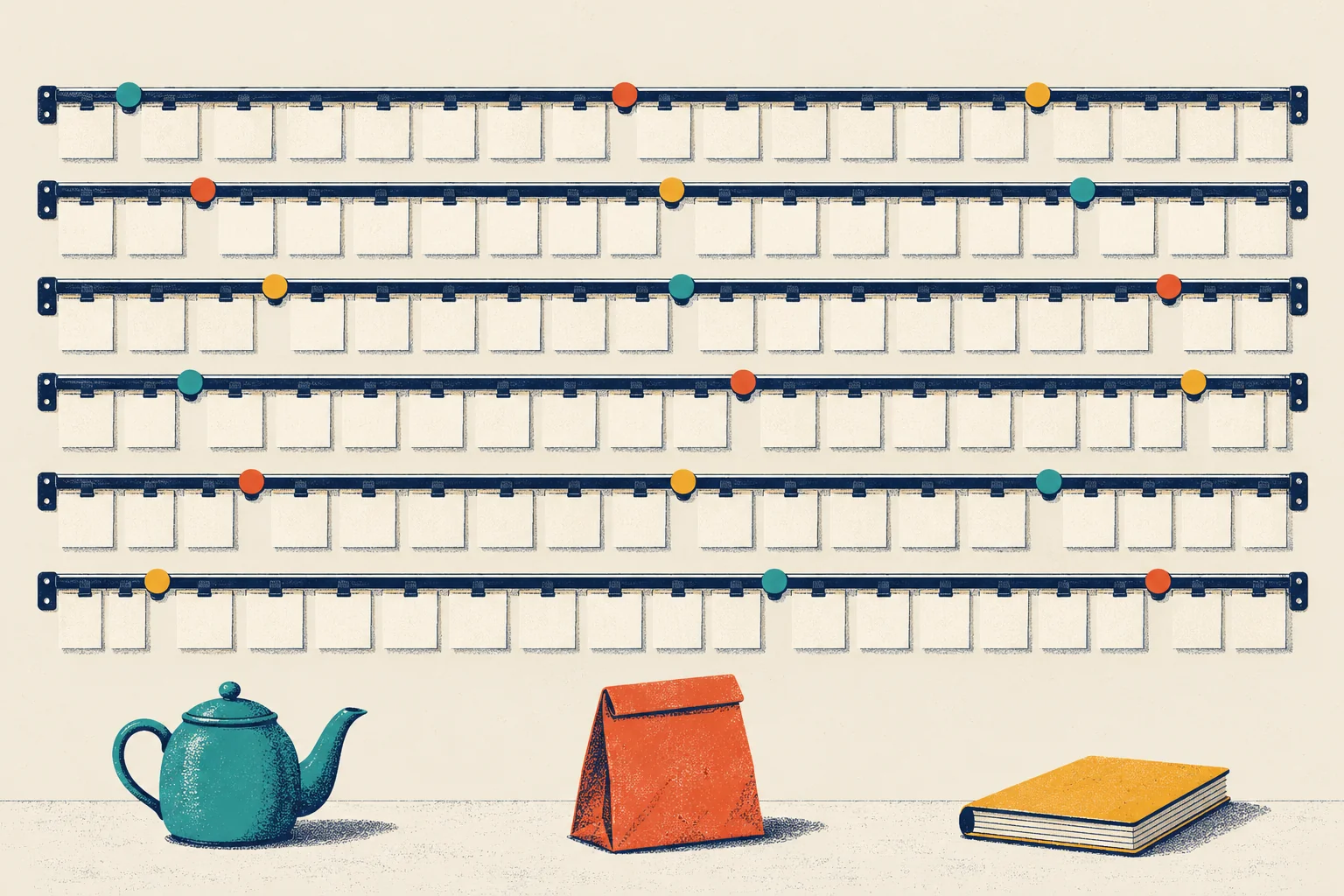
Look at the picture above: six rails of tickets, three coloured clips on each rail, and three readers below (a teapot, a delivery bag and a ledger book). By the end of this chapter, you will know what each part means.
Life before the rail
Before Kafka, Steep’s order service, the program that takes orders and saves them, did everything itself. After each order, it called five other systems, one after another: the kitchen printer in the store, delivery dispatch, the loyalty-points system, the fraud check, and analytics. It told the customer “Done” only after all five had answered.
One evening, the loyalty system became very slow. Every checkout waited for it, and then gave up. For the rest of that evening, customers could not buy tea, because a points counter was broken.
Systems break. The real problem was tight coupling: checkout could only work if all five systems worked at the same moment.
The fix was a rail in the middle. Now the order service clips one ticket per order to the rail and tells the customer “Done” at once. The other five systems read the ticket when they are ready. If loyalty is down for an hour, its tickets wait, and it catches up later. No customer notices.
Tools that pass messages between systems like this are often called message queues. Kafka is one of them, with one big difference.
Tickets, writers and readers
Events. In the tea shop, the ticket the cashier writes when a customer pays is an event. You met app events in Chapter 7: small records that say who did what, and when. Kafka also calls them messages or records. Mia’s first tap on that Monday morning became an event: user u000001 did app_open, and the event reached Kafka at 08:43:49.
Producers and consumers. The one who writes tickets is the producer. The one who reads them is the consumer. At Steep, the order service is a producer. So is the app: every tap goes to Steep’s servers, and a small service there writes it to Kafka. The kitchen printer, the loyalty system and the data warehouse are consumers. Producers and consumers never talk to each other, only to the rail. That is the whole trick.
Topics. A topic is a named rail for one kind of ticket. Steep has an orders topic for orders and an app_events topic for taps in the app. Mia’s missing event belongs on app_events.
The log. Here Kafka is different from a kitchen. In a kitchen, the cook takes the ticket off the rail, and when the drink is made, the ticket goes in the bin. A list where reading an item removes it is a to-do queue.
Kafka never removes a ticket because someone has read it. New tickets are added at the end, and old ones are never changed. Readers look; they do not take. A list that you can only add to, and that keeps its order, is a log. Engineers often say append-only log, because “append” means “add to the end”.
This small difference is the most important idea in this chapter. Because nothing is removed, many readers can read the same tickets, each at its own speed, and a reader that made a mistake can read them again.
Offsets. Every ticket on a rail gets a number when it is clipped on: 0 for the first ticket, 1 for the next, and so on. Once a ticket is safely stored, its number never changes. This position is the ticket’s offset.
“Pre-numbered documents,” said Mia. “In audit, we test those for gaps.”
“That is exactly what we are going to do,” said Theo. “In our dump, the test works. Real Kafka has one exception. Kafka copies each ticket to other machines. If a machine breaks before the copy exists, the ticket is lost and the next ticket takes its number. Then the loss leaves no hole.”
Mia wrote that down too. An exception is something to test, not something to ignore.
Six rails, not one
On that Monday alone, 51,927 app events arrived. One rail for all of them would become a traffic jam.
So Kafka splits each topic into several rails that work side by side. Each one is called a partition. A partition is a complete log of its own, with its own offsets. Steep’s app_events topic has 6 partitions: the rails in the picture. Because each partition counts on its own, the address of a ticket is a pair: partition and offset.
Splitting has a price. Inside one partition, tickets stay in the order they arrived. Across partitions, there is no order at all. Offsets cannot tell you whether ticket 500 on one rail came before or after ticket 300 on another rail. Kafka promises order only within a partition.
So how does Kafka choose a rail for each ticket? The producer can give every ticket a key, and turns the key into a partition number with a fixed formula. The same key always leads to the same partition, as long as the number of partitions does not change. Same word, different thing: in Chapter 1, a key was a unique ID, like order_id. A Kafka key is not unique. Every ticket from one user carries the same key; it only chooses the rail. Steep uses the user ID as the key. All of one user’s taps land on the same rail, so they stay in order: app_open, then view_menu, then add_to_cart. The rail keeps the order in which tickets arrive. If they arrive in the wrong order, the rail keeps that order too.
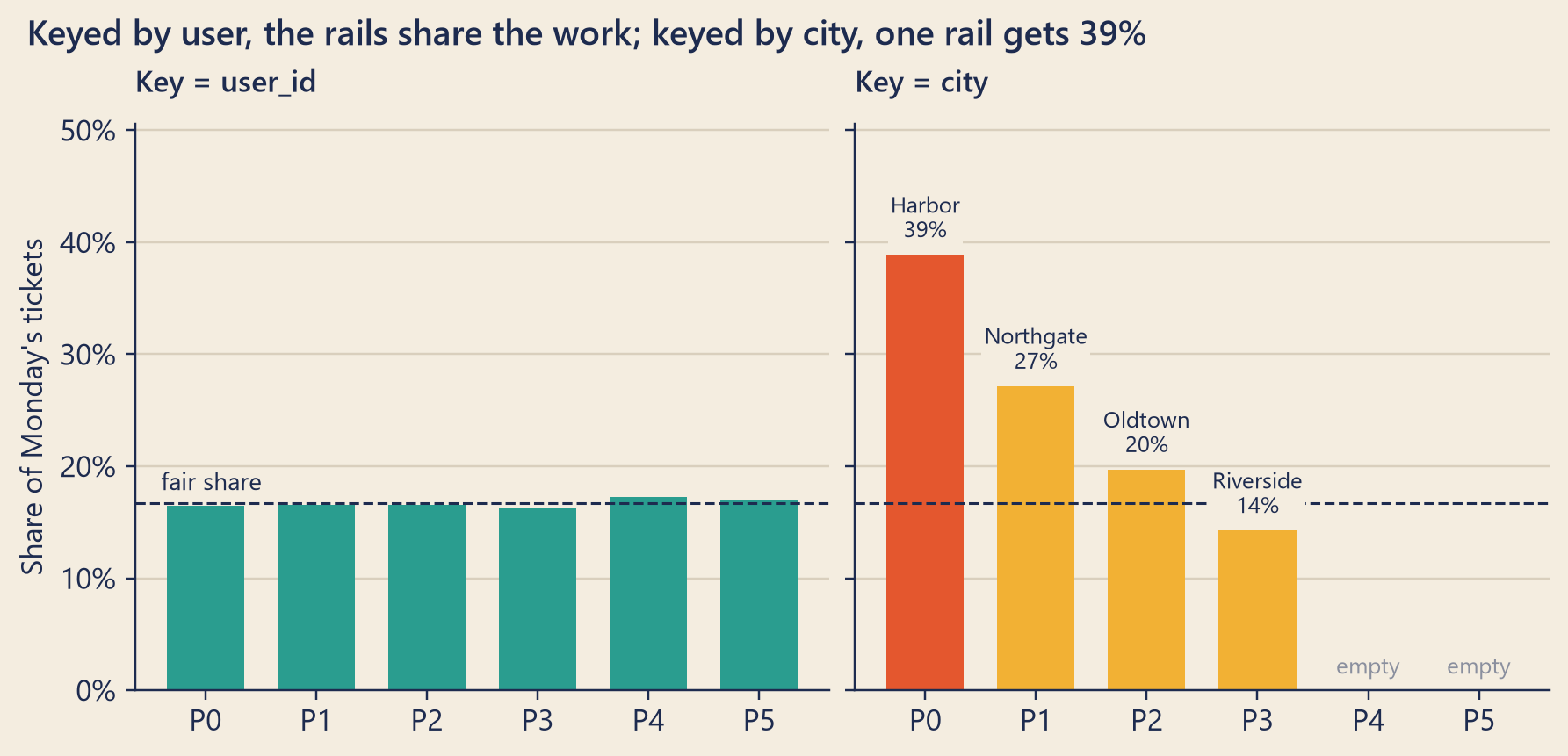
This key also spreads the work. Monday’s events came from 14,259 different users. The formula scatters users almost at random, so with thousands of users each rail gets about the same number. Each partition held between 16.2% and 17.3% of the day’s events, close to the fair share of 16.7%.
Now imagine that Steep had used the city as the key. With only 4 cities, at most 4 rails could get tickets; the rest would sit empty. Worse, Harbor is the largest city: on Monday 14 September, 38.9% of the day’s events came from Harbor users. Every one of them would land on the same rail. A partition that gets far more than its fair share is a hot partition. As you will see below, a team gives each rail to only one reader. That one reader would have far more work than the others. The same Harbor problem returns in Chapter 10, under the name data skew.
Figure 1: Monday’s app_events tickets on each partition. Left: the real topic, keyed by user ID. Right: the same tickets if the key were the city, in the best case where each city gets a rail of its own.
Finding Mia’s tickets
Theo opened Monday’s dump of the app_events topic: every ticket that arrived on Mia’s first day, with its partition, offset, key and contents. Mia’s key is u000001. All of her tickets were on partition 2, as the key promised.
Table 1: Every ticket with key u000001 on Monday’s app_events rail, in offset order. Times are Harbor time.
Partition
Offset
Event
Arrived
2
1019041
app_open
08:43:49
2
1019042
view_menu
08:43:57
2
1019046
add_to_cart
08:45:42
2
1019047
checkout_start
08:46:29
Mia read the four lines twice. Open the app. Look at the menu. Add a drink to the cart. Start the checkout. Then nothing. The fifth ticket, order_completed, was not there.
“So Kafka lost it,” she said.
“Maybe,” said Theo. “What does an auditor do now?”
Mia knew the answer. With pre-numbered documents, you look for a gap. In Steep’s dump, a ticket that was clipped on and then lost would leave a hole on partition 2. Her order was placed at 08:47:21. So the missing ticket should have arrived soon after that moment. Theo listed every ticket on her rail from a moment before her first tap to shortly after her order.
Table 2: Mia’s partition around the moment of her order. Her own tickets are in bold. The offsets run on without a gap.
Offset
Key
Event
Arrived
1019040
u391520
checkout_start
08:43:47
1019041
u000001
app_open
08:43:49
1019042
u000001
view_menu
08:43:57
1019043
u711784
app_open
08:44:37
1019044
u711784
view_menu
08:44:41
1019045
u876392
checkout_start
08:44:49
1019046
u000001
add_to_cart
08:45:42
1019047
u000001
checkout_start
08:46:29
1019048
u557960
app_open
08:47:13
1019049
u557960
view_menu
08:47:18
1019050
u557960
add_to_cart
08:47:39
1019051
u430772
app_open
08:47:46
1019052
u557960
checkout_start
08:47:46
1019053
u804912
app_open
08:47:48
1019054
u430772
view_menu
08:47:48
The numbers ran on without a break, from 1019040 to 1019054. Offset 1019049 was the last ticket before her order, and 1019050 was the first ticket after it. Nothing is missing between them.
“That is one small stretch,” said Mia. “What about the rest of the day?”
Theo checked every partition. On each rail, he took the first and last offset of the day and the number of tickets in between. If no ticket is missing, the count equals last minus first, plus one. For example, offsets 10 to 14 hold 14 − 10 + 1 = 5 tickets. On all 6 partitions, the count matched: 0 missing offsets.
Mia’s order was not the only one without a ticket. Of the 5,711 orders placed on Monday, 843 had no order_completed ticket on Monday’s rail. Tickets for late-evening orders can arrive after midnight, so Theo also checked the warehouse, which keeps its own copy of every event. That left 839 orders, about one in 7, with no ticket anywhere. Hundreds of missing tickets, and not one hole in the rail.
“One Monday is a small sample,” said Mia. “Does it speak for the week of the drop, 7 to 13 September?”
Theo thought it did. Mia’s phone ran app version 3.2.0, which came out on 7 September and was still the newest version. And her own reconciliation in Chapter 7 had found the same kind of gap on every day of that week.
Mia remembered the exception. “Could a broken Kafka machine have lost these tickets without a hole?”
“Look at the pattern,” said Theo. The missing orders came from users on all 6 rails, spread almost evenly. And for 836 of the 839 orders, a checkout_start ticket from the same user did arrive. A broken machine would lose all kinds of tickets, and only on some rails. This loss hit one kind of ticket, on every rail.
“So the tickets were never clipped on,” said Mia slowly.
“Never written,” said Theo. “Look at your phone’s tickets. Four of them arrived in order, over 2 minutes and 40 seconds. Your checkout_start arrived 52 seconds before the database recorded your order. So the phone could reach Kafka less than a minute before the order. It was not a bad signal. The fifth ticket was not lost inside Kafka. It never reached the rail. It was lost before that: in the app, or in the service that writes to Kafka.”
Which of the two? In Chapter 7, 98.7% of the orders with no event were iOS orders. The writing service carries events from every platform. If it were losing them, Android and web orders would go missing too. So the app is the main suspect, and the service is a smaller one. The last proof needs the app’s own error logs, and those live on customers’ phones. Only the iOS team can collect them.
Mia wrote in her notebook: Kafka: innocent. Suspects: the iOS app (main), the service that writes to Kafka (smaller). She wrote “suspects”, not “guilty”. She had not seen the code of either one yet.
Many readers, one rail
Now look at the clips in the picture again. Each colour is one team of readers. The teal clips belong to the teapot: the kitchen. The tomato clips belong to the delivery bag: dispatch. The mustard clips belong to the ledger book: the data warehouse.
A team like this is a consumer group: a set of consumers that share the work of reading a topic. Kafka has two rules for groups.
Inside one group, each partition has exactly one reader. One member may read several partitions, but two members never read the same one. This keeps each partition’s order: two readers on one rail could handle ticket 6 before ticket 5. If a group has more members than the topic has partitions, the extra members sit idle, as spare readers.
Different groups do not share. Each group reads every ticket, at its own speed. The kitchen reading a ticket does not stop the warehouse from reading it too. That is why every rail in the picture has three clips.
Committed offset. Each clip marks how far its group has read. Kafka stores this bookmark for every group and every partition. Here, commit means saving the bookmark, so the bookmark is called the committed offset. To be exact, it is the offset of the next ticket the group will read. When a reader crashes, another member of the group takes over its partitions and starts from this bookmark.
Lag. The distance from a group’s bookmark to the newest ticket on the rail is the group’s lag: tickets that have been written but not yet read. Some lag is normal. Lag that keeps growing means that the readers cannot keep up.
Retention and replay. Tickets do not stay on the rail forever. Each topic has a retention period. Kafka keeps each ticket for at least that long, then deletes old tickets in batches. In Apache Kafka, the default is seven days. That is why Theo had to save Monday’s dump. Within that window, a group can move its bookmark backwards and read the same tickets again. This is a replay, like replaying the binlog in Chapter 7. If loyalty gave wrong points for three days, the team can fix the bug and replay those days. A to-do queue cannot do this.
Retention also sets a deadline. If a group reads too slowly, old tickets may be deleted first. That group never sees them. (The box “Under the hood” below shows what the reader does next.)
Once, twice or never
Things fail on the way to the rail and on the way from it. A producer sends a ticket, and the network breaks before the answer comes back. Did the ticket arrive? The producer cannot know. There are three possible promises. The first two are simple. Readers have the same two choices.
At-most-once. Never send again. A ticket is never duplicated, but some tickets may be lost. A reader works this way if it saves its bookmark before it handles the ticket. If it crashes in between, its replacement skips that ticket.
At-least-once. Send again until you hear “got it”. No ticket is lost, but some may arrive twice. A reader works this way if it saves its bookmark after it handles the ticket. If it crashes in between, its replacement handles that ticket a second time.
Exactly-once. Every ticket has its effect once and only once. This is what everybody wants, and it is the hardest to get.
Kafka offers two tools for exactly-once. The first is the idempotent producer. Idempotent means that doing something twice has the same effect as doing it once. Kafka gives each producer an ID and numbers its tickets, so when the producer resends a ticket, Kafka sees the copy and does not write it again. The second tool is transactions. A transaction groups several writes. Either all of them happen, or none do. Together, these give exactly-once processing for programs that read from Kafka and write back to Kafka.
These tools have limits. The idempotent producer only catches its own copies, while it runs without restarting. If a phone sends the same tap twice, Kafka sees two different tickets. And when data leaves Kafka for another system, such as a warehouse table, exactly-once needs that system’s help. Kafka’s own default is at-least-once. The safe habit: give every event a unique ID at the source, and remove copies by that ID downstream (later, in the systems that read the data).
This is not theory. On Monday’s rail, 148 event IDs appear twice. That is 0.3% of all tickets. For example, one view_menu ticket sits at offset 1036294 on partition 0, and again at offset 1036321, 139 seconds later. This is at-least-once delivery in real data: somewhere between the phone and the rail, a sender did not hear “got it” in time and sent the ticket again.
Copies matter when you count. Monday’s rail holds 4,885 order_completed tickets, but they describe only 4,869 different orders. Count raw tickets, and 16 orders are counted twice. The table dwd_event_detail, a cleaned table in the data warehouse, removes the copies by event_id before anyone counts.
Why a crash does not lose tickets
Kafka keeps copies of each partition on several machines, so one broken machine loses nothing, as long as the team sets Kafka up with care. The box below explains the copies and the settings.
NoteUnder the hood
Choosing a partition. For a ticket with a key, Kafka’s standard producer computes (slightly simplified)
where murmur2 is a hash function (a formula that turns any text into a number), \(N\) is the number of partitions, and “mod” means the remainder after dividing by \(N\). Here, a client is the code library a program uses to talk to Kafka, not the customer’s phone of Chapter 7. This formula is the Java client’s default. Clients built on librdkafka use a different hash, so producers written with different clients can send the same key to different partitions. Change \(N\), and most keys move to a different partition. That is why teams pick the number of partitions with care. Kafka lets you add partitions to a topic, but never remove them.
where the log-end offset is the offset the next new ticket will get. The group’s total lag is the sum over its partitions.
When the next ticket is already deleted. A reader’s settings decide what happens next. The setting auto.offset.reset is latest by default: the reader jumps to the newest ticket and skips everything in between. Bookmarks expire too. If a group has no members for seven days (the default), Kafka forgets where it was.
Copies and confirmations. Kafka runs on several servers, called brokers. In production (in the real, running system), each partition is usually copied to more than one broker; the default is one copy. The number of copies is the replication factor, and three is a common choice. One copy, the leader, takes the new tickets; the others copy them. The copies that are caught up, the leader included, are the in-sync replicas. The producer setting acks says how many copies must say “got it” before a write counts. With acks=all, the leader answers only after all in-sync replicas have the ticket. If the leader’s machine then dies, a caught-up follower takes over, and the ticket is still there. The topic setting min.insync.replicas sets a minimum. If fewer copies than this are in sync, Kafka refuses the write and the producer gets an error, instead of a promise that it cannot keep. In short, with acks=all, a ticket that Kafka has confirmed will not be lost as long as at least one in-sync copy survives. Two warnings. With acks=1, the leader confirms before any copy exists. And min.insync.replicas is 1 by default, so a team has to raise it.
Gaps in real Kafka. In this book’s dump, a gap would mean a lost ticket. Real Kafka is different. If a broker loses a ticket before copying it (with acks=1, or after an “unclean” leader election), the next ticket can take the same offset, so no hole appears. Some gaps are harmless: transaction markers use up offsets, and in “compacted” topics Kafka later, in the background, removes an old ticket once a newer ticket with the same key exists. So in a real cluster (a group of machines working as one), offsets alone cannot prove that nothing was lost. Engineers also check the producer’s error logs and the acks settings.
Other kinds of group. This chapter describes classic consumer groups. Newer versions of Kafka also offer share groups, where several members can read from the same partition, a little like a to-do queue. They trade the per-partition order for more flexible sharing.
Try it
The first playground is a toy rail with made-up orders, so you can break things safely.
The ticket-rail simulator. Each row is one partition. Tickets show their offset and their key. The teal clip is the group’s bookmark (its committed offset). A reader saves it after every three tickets and whenever it has caught up. A rail keeps only its newest 30 tickets, a stand-in for “seven days”.
Show the code
railSimulator = {const C = {teal:"#2a9d8f",tomato:"#e4572e",tomatoText:"#b8401c",mustard:"#f2b134",ink:"#1d2b4f",paper:"#f4ede0",deep:"#e3d9c4",muted:"#8a8f9e",white:"#fffdf8",unsaved:"#f8dfa6"};const CITIES = [["Harbor","HBR",0.40], ["Northgate","NTG",0.27], ["Oldtown","OLD",0.18], ["Riverside","RVS",0.15]];const TICK_MS =700;// one reading stepconst COMMIT_EVERY =3;// a reader saves its bookmark after every 3 ticketsconst RETENTION =30;// tickets kept per railconst ROW =62, PITCH =34, TW =30, TH =30;const WIDE = {W:720,LEFT:112,SLOTS:15};// drawing size on a wide screenconst NARROW = {W:330,LEFT:72,SLOTS:6};// and on a phonelet geo = WIDE;const listOf = xs => (xs.length<2? xs.join("") : xs.slice(0,-1).join(", ") +" and "+ xs[xs.length-1]);// A small, stable string hash (FNV-1a). Kafka uses murmur2; any stable hash shows the idea.const hash = s => {let h =2166136261;for (let i =0; i < s.length; i++) { h ^= s.charCodeAt(i); h =Math.imul(h,16777619); }return h >>>0; };const randomCity = () => {let r =Math.random();for (const c of CITIES) { r -= c[2];if (r <0) return c; }return CITIES[0]; };const partitionsIn = Inputs.range([1,6], {step:1,value:6,label:"Partitions"});const consumersIn = Inputs.range([1,6], {step:1,value:3,label:"Consumers in the group"});const keyIn = Inputs.radio(["user_id","city"], {value:"user_id",label:"Key"});const runIn = Inputs.toggle({label:"Consumers reading",value:true});let topic, members, owner, stats, note;functionnewTopic(P) {const zeros = () =>newArray(P).fill(0);return {P,rails:Array.from({length: P}, () => []),start:zeros(),end:zeros(),committed:zeros(),pos:zeros(),maxRead:zeros()}; }functionnewMembers(n) {returnArray.from({length: n}, (_, i) => ({id: i +1,alive:true,rr:0})); }functionassign() { // range assignment, like Kafka's RangeAssignor for a single topicconst alive = members.filter(m => m.alive); owner =newArray(topic.P).fill(null);if (alive.length===0) return;const base =Math.floor(topic.P/ alive.length), extra = topic.P% alive.length;let p =0; alive.forEach((m, i) => {for (let k =0; k < base + (i < extra ?1:0); k++) owner[p++] = m.id; }); }functionpartsOf(id) {const mine = []; owner.forEach((o, p) => { if (o === id) mine.push(p); });return mine; }functionreset(text) { topic =newTopic(partitionsIn.value); members =newMembers(consumersIn.value); stats = {sent:0,read:0,twice:0,expired:0};assign(); note = text; }functionexpireOldest(p) {const old = topic.rails[p].shift();if (old.offset>= topic.pos[p]) stats.expired+=1; topic.start[p] = old.offset+1; topic.pos[p] =Math.max(topic.pos[p], topic.start[p]); topic.committed[p] =Math.max(topic.committed[p], topic.start[p]); }functionsendOrders(n) {for (let i =0; i < n; i++) {let key, label;if (keyIn.value==="city") {const c =randomCity(); key = c[0]; label = c[1]; } else {const id =String(1+Math.floor(Math.random() *90000)).padStart(6,"0"); key ="u"+ id; label ="u…"+ id.slice(-3); }const p =hash(key) % topic.P; topic.rails[p].push({offset: topic.end[p], label}); topic.end[p] +=1; stats.sent+=1;while (topic.rails[p].length> RETENTION) expireOldest(p); } }functionreadOne(p) {const o = topic.pos[p];if (o < topic.maxRead[p]) stats.twice+=1;else topic.maxRead[p] = o +1; topic.pos[p] = o +1; stats.read+=1;if (topic.pos[p] - topic.committed[p] >= COMMIT_EVERY || topic.pos[p] === topic.end[p]) { topic.committed[p] = topic.pos[p]; } }functionstep() {let changed =false;for (const m of members) {if (!m.alive) continue;const mine =partsOf(m.id);for (let k =0; k < mine.length; k++) {const p = mine[(m.rr+ k) % mine.length];if (topic.pos[p] < topic.end[p]) {readOne(p); m.rr= (m.rr+ k +1) % mine.length; changed =true;break; } } }return changed; }functioncrash() {const alive = members.filter(m => m.alive);if (alive.length===0) { note ="Every consumer has crashed. Nobody reads, so the lag grows. "+"Move the consumers slider to start a fresh group.";return; }const victim = alive.reduce((a, b) => (partsOf(b.id).length>partsOf(a.id).length? b : a));const moved =partsOf(victim.id);let again =0; owner.forEach((o, p) => {if (o === victim.id) { again += topic.pos[p] - topic.committed[p]; topic.pos[p] = topic.committed[p];// work after the last saved bookmark is lost } else { topic.committed[p] = topic.pos[p];// the others save their bookmarks in the rebalance } }); victim.alive=false;assign();if (members.every(m =>!m.alive)) { note =`C${victim.id} crashed. No consumers are left, so nobody reads and the lag grows.`;return; } note =`C${victim.id} crashed. The group gave ${listOf(moved.map(p =>"P"+ p))} `+`to the members still alive. They start from the last saved bookmark, so `+`${again} ticket${again ===1?"":"s"} will be read a second time.`; }functionreplay() {for (let p =0; p < topic.P; p++) { topic.pos[p] = topic.start[p]; topic.committed[p] = topic.start[p]; topic.maxRead[p] = topic.start[p]; } note ="Replay: the group moved every bookmark back to the oldest ticket still on its rail. "+"Reading had removed nothing, so the group reads it all again."; }functionhotRails() {const total = topic.end.reduce((a, b) => a + b,0);const hot =newSet();if (topic.P<2|| total <20) return hot; topic.end.forEach((n, p) => { if (n / total >=1.8/ topic.P) hot.add(p); });return hot; }functionwindowStart(p) {const {start, end, committed} = topic;const {SLOTS} = geo;if (end[p] - committed[p] <= SLOTS -4) returnMath.max(start[p], end[p] +1- SLOTS);returnMath.max(start[p], committed[p] -3); }functiondrawRail(p, y, hot) {const out = [];const {W, LEFT, SLOTS} = geo;const {start, end, committed, pos} = topic;const ws =windowStart(p);const railY = y +12;if (hot) { out.push(htl.svg`<rect x="2" y="${y}" width="${W -4}" height="${ROW -6}" rx="6" fill="${C.tomato}" fill-opacity="0.08" stroke="${C.tomato}" stroke-width="1.5"/>`); } out.push(htl.svg`<text x="12" y="${y +24}" font-size="15" font-weight="600" fill="${C.ink}">P${p}</text>`); out.push(owner[p] ==null? htl.svg`<text x="12" y="${y +42}" font-size="11" fill="${C.tomatoText}">no reader</text>`: htl.svg`<text x="12" y="${y +42}" font-size="11" fill="${C.ink}">read by C${owner[p]}</text>`); out.push(htl.svg`<line x1="${LEFT -6}" x2="${LEFT + SLOTS * PITCH}" y1="${railY}" y2="${railY}" stroke="${C.ink}" stroke-width="3" stroke-linecap="round"/>`);for (let s =0; s < SLOTS; s++) {const o = ws + s;if (o >= end[p]) break;const x = LEFT + s * PITCH;const t = topic.rails[p][o - start[p]];const fill = o < committed[p] ? C.deep: o < pos[p] ? C.unsaved: C.white;const ink = o < committed[p] ? C.muted: C.ink; out.push(htl.svg`<rect x="${x}" y="${railY +4}" width="${TW}" height="${TH}" rx="2" fill="${fill}" stroke="${ink}" stroke-width="1"/>`); out.push(htl.svg`<text x="${x + TW /2}" y="${railY +17}" text-anchor="middle" font-size="10.5" font-weight="600" fill="${ink}">${o}</text>`); out.push(htl.svg`<text x="${x + TW /2}" y="${railY +29}" text-anchor="middle" font-size="7.5" fill="${ink}">${t.label}</text>`); }if (ws > start[p]) { out.push(htl.svg`<text x="${LEFT -10}" y="${y +24}" text-anchor="end" font-size="10" fill="${C.muted}">+${ws - start[p]}</text>`); }if (end[p] > ws + SLOTS) { out.push(htl.svg`<text x="${LEFT + SLOTS * PITCH +6}" y="${railY +24}" font-size="10" fill="${C.muted}">+${end[p] - ws - SLOTS}</text>`); }const clipX = LEFT + (committed[p] - ws) * PITCH + TW /2; out.push(htl.svg`<circle cx="${clipX}" cy="${railY}" r="7" fill="${C.teal}" stroke="${C.ink}" stroke-width="1.2"/>`);const lag = end[p] - committed[p]; out.push(htl.svg`<text x="${W -8}" y="${y +26}" text-anchor="end" font-size="13" font-weight="${lag >0?600:400}" fill="${lag >0? C.ink: C.muted}">lag ${lag}</text>`);if (hot) { out.push(htl.svg`<text x="${W -8}" y="${y +44}" text-anchor="end" font-size="11" font-weight="600" fill="${C.tomatoText}">hot</text>`); }return out; }const svgBox = htl.html`<div class="rs-svg"></div>`;const membersBox = htl.html`<div class="rs-members"></div>`;const statsBox = htl.html`<div class="rs-stats"></div>`;const noteBox = htl.html`<div class="rs-note" aria-live="polite"></div>`;functionrender() {const hot =hotRails();const {W} = geo;const H = topic.P* ROW +4;const shapes = [];for (let p =0; p < topic.P; p++) shapes.push(...drawRail(p,4+ p * ROW, hot.has(p)));const totalLag = topic.end.reduce((sum, e, p) => sum + e - topic.committed[p],0);const idle = members.filter(m => m.alive&&partsOf(m.id).length===0).length;const label =`${topic.P} partition${topic.P===1?"":"s"}, `+`${members.filter(m => m.alive).length} consumers alive, `+`${idle} idle, total lag ${totalLag}`+ (hot.size?`, hot partitions: ${hot.size}`:""); svgBox.replaceChildren(htl.svg`<svg viewBox="0 0 ${W}${H}" width="100%" role="img" aria-label="${label}" style="max-width:${W}px;font-family:Inter,system-ui,sans-serif">${shapes}</svg>`); membersBox.replaceChildren(...members.map(m => {const mine =partsOf(m.id);const status =!m.alive?"crashed": mine.length?"reads "+ mine.map(p =>"P"+ p).join(", "):"idle: no partition left";const cls =!m.alive?"rs-member rs-crashed": mine.length?"rs-member":"rs-member rs-idle";return htl.html`<div class=${cls}><strong>C${m.id}</strong> <span>${status}</span></div>`; })); statsBox.textContent=`Sent ${stats.sent} · Read ${stats.read} · Total lag ${totalLag} · `+`Read twice after a crash ${stats.twice}`+ (stats.expired?` · Deleted before anyone read them ${stats.expired}`:""); noteBox.textContent= note; }const button = (label, action) => {const b = htl.html`<button type="button" class="rs-btn">${label}</button>`; b.addEventListener("click", () => { action();render(); });return b; }; partitionsIn.addEventListener("input", () => {reset(`A new topic with ${partitionsIn.value} partition${partitionsIn.value===1?"":"s"}. `+"All rails start empty.");render(); }); keyIn.addEventListener("input", () => {reset(`New key: ${keyIn.value}. All rails start empty.`);render(); }); consumersIn.addEventListener("input", () => {for (let p =0; p < topic.P; p++) topic.committed[p] = topic.pos[p];// a calm rebalance saves first members =newMembers(consumersIn.value);assign();const idle = members.filter(m =>partsOf(m.id).length===0).length; note =`The group now has ${members.length} consumer${members.length===1?"":"s"}. `+ (idle ?`${idle} of them sit idle: there are not enough partitions for everyone.`:"Kafka shared out the partitions again.");render(); });reset("Ten orders have arrived. Watch the consumers read them.");sendOrders(10);const timer =setInterval(() => { if (runIn.value&&step()) render(); }, TICK_MS);const resizer =newResizeObserver(() => { // switch to the phone layout on narrow screensconst next = svgBox.clientWidth>0&& svgBox.clientWidth<560? NARROW : WIDE;if (next !== geo) { geo = next;render(); } }); resizer.observe(svgBox); invalidation.then(() => { clearInterval(timer); resizer.disconnect(); });render();const swatch = (fill, stroke) => htl.html`<span class="rs-swatch" style="background:${fill};border-color:${stroke}"></span>`;const style =document.createElement("style"); style.textContent=` .rs-wrap { font-family: Inter, system-ui, sans-serif; color: ${C.ink}; } .rs-controls { display: flex; flex-wrap: wrap; gap: 0.2rem 1.5rem; align-items: flex-start; } .rs-buttons { display: flex; flex-wrap: wrap; gap: 0.4rem; margin: 0.4rem 0 0.6rem; } .rs-btn { font: 600 0.85rem Inter, system-ui, sans-serif; color: ${C.paper}; background: ${C.ink}; border: 0; border-radius: 5px; padding: 0.45rem 0.8rem; cursor: pointer; } .rs-btn:hover { background: ${C.teal}; } .rs-btn:focus-visible { outline: 3px solid ${C.mustard}; outline-offset: 2px; } .rs-members { display: flex; flex-wrap: wrap; gap: 0.4rem; margin: 0.4rem 0; } .rs-member { border: 2px solid ${C.teal}; border-radius: 6px; padding: 0.15rem 0.55rem; font-size: 0.8rem; background: rgba(255, 255, 255, 0.55); } .rs-idle { border-style: dashed; border-color: ${C.muted}; color: #5f6475; } .rs-crashed { border-color: ${C.tomato}; color: ${C.tomatoText}; } .rs-stats, .rs-note, .rs-legend { font-size: 0.82rem; margin-top: 0.3rem; } .rs-note { min-height: 2.6em; } .rs-legend { display: flex; flex-wrap: wrap; gap: 0.3rem 1rem; color: #3d4766; } .rs-swatch { display: inline-block; width: 0.9em; height: 0.9em; border: 1px solid; border-radius: 2px; vertical-align: -0.1em; margin-right: 0.3em; } .rs-dot { display: inline-block; width: 0.9em; height: 0.9em; border-radius: 50%; background: ${C.teal}; border: 1px solid ${C.ink}; vertical-align: -0.1em; margin-right: 0.3em; }`;return htl.html`<div class="rs-wrap">${style} <div class="rs-controls">${partitionsIn}${consumersIn}${keyIn}${runIn}</div> <div class="rs-buttons">${button("Send 10 orders", () => { sendOrders(10); note ="Ten new tickets were clipped to the rails, each by its key."; })}${button("Crash a consumer", crash)}${button("Replay from start", replay)} </div>${svgBox} <div class="rs-legend"> <span>${swatch(C.white, C.ink)}not read yet</span> <span>${swatch(C.unsaved, C.ink)}read, bookmark not saved yet</span> <span>${swatch(C.deep, C.muted)}read and saved (still on the rail)</span> <span><span class="rs-dot"></span>the group's bookmark</span> </div>${membersBox}${statsBox}${noteBox} </div>`;}
Things to try:
Set the consumers to 6 and the partitions to 4. Two consumers sit idle.
Switch the key to city and send orders a few times. The busiest rails are marked “hot”, some rails stay empty, and Oldtown and Riverside even share a rail (P4).
Send orders three times, then crash a consumer while the readers are busy. A few tickets are often read twice: at-least-once delivery.
Press “Replay from start”. Every ticket is read again, because reading never removed it.
Set the partitions to 1, switch the consumers off, and send orders four times. The oldest tickets are deleted before anyone reads them.
This toy is simpler than Kafka in two ways. It notices a crash at once, where real Kafka waits about 45 seconds by default. And when unread tickets are deleted, its reader restarts from the oldest ticket left; real Kafka, by default, jumps to the newest one.
The second playground is real: Monday’s dump, in a small database inside your browser. Each row is one ticket. Its value holds the event itself, and value.event_name reaches inside it.
Monday’s rail, in your browser. Pick a starting query, change it if you like, and press “Run query”.
railQueries = {const f = railFacts;const arrived =`strftime(epoch_ms("timestamp") - INTERVAL ${f.hoursBehindUtc} HOUR, '%H:%M:%S') AS arrived`;returnnewMap([ ["Mia's tickets",`-- Every ticket with Mia's key. Times are Harbor time.-- UTC is world standard time; Steep's cities are ${f.hoursBehindUtc} hours behind it.SELECT "partition", "offset", key, value.event_name AS event_name,${arrived}FROM app_eventsWHERE key = '${f.user}'ORDER BY "partition", "offset";`], ["Her neighbours",`-- Partition ${f.partition}, around Mia's order. Look for a gap in the offsets.SELECT "offset", key, value.event_name AS event_name,${arrived}FROM app_eventsWHERE "partition" = ${f.partition} AND "offset" BETWEEN ${f.first} AND ${f.last}ORDER BY "offset";`], ["Missing offsets?",`-- If no ticket is missing, count = last - first + 1.SELECT "partition", count(*) AS tickets, min("offset") AS first_offset, max("offset") AS last_offset, max("offset") - min("offset") + 1 - count(*) AS missing_offsetsFROM app_eventsGROUP BY "partition"ORDER BY "partition";`], ["Tickets sent twice",`-- The same event_id at two offsets: at-least-once delivery.SELECT CAST(value.event_id AS VARCHAR) AS event_id, min(value.event_name) AS event_name, min("partition") AS "partition", min("offset") AS first_offset, max("offset") AS second_offsetFROM app_eventsGROUP BY 1HAVING count(*) > 1ORDER BY "partition", first_offsetLIMIT 20;`] ]);}
{if (railResult.error) {return htl.html`<p style="color:#b8401c;font-family:Inter,system-ui,sans-serif;font-size:0.85rem">The query did not run: ${railResult.error}</p>`; }// Show numbers as written (offsets are labels, so no thousands separators).const plain = v => (v ==null?"":String(v));const columns = railResult.rows.length?Object.keys(railResult.rows[0]) : [];return Inputs.table(railResult.rows, {rows:16,layout:"auto",format:Object.fromEntries(columns.map(c => [c, plain])) });}
The first query should show the same four tickets as Table 1. Try the other starting points too: look for gaps, then look for copies.
Common traps
Treating Kafka as a database. Kafka finds tickets by partition and offset, not by what is written on them, so finding order A1024 means scanning the whole rail. And A1024 is a label, not a key in the Chapter 1 sense (a unique ID): by 22 September, it appears on 456 different orders.
Expecting one global order. Offsets count per partition, so sorting tickets from different partitions by offset means nothing.
Choosing a key with few values. City or “true/false” keys create hot partitions.
Ignoring copies. Count distinct event_ids, not raw rows.
Not watching lag. A reader that falls behind makes its reports late and can lose tickets to retention. Put lag on someone’s alert list.
TipAudit Instinct · The journal and the duplicate payment test
The log is a journal. In accounting, you never erase a line in the journal. If an entry is wrong, you post a new entry that reverses it, and both stay on the record. Kafka works in a similar way. Nobody edits a ticket in place. A correction is a new ticket. But Kafka is not a vault: retention deletes old tickets, and an administrator can delete records. For a lasting audit trail, copy the tickets to storage you control.
Copies need the duplicate payment test. Auditors test payments for duplicates: the same invoice number, paid twice. At-least-once delivery creates the same risk in data. The test is the same too. Group by the ID that should be unique, and look for any ID that appears more than once. On Monday’s rail, that test finds 148 event IDs.
NoteInterview Corner
Q1. How does Kafka keep messages in order?
NoteA short answer
Only within a partition, which consumers read in offset order. There is no order across partitions. Give related messages the same key, so that they land in the same partition. One more trap: with retries on and several batches (groups of tickets sent together) on the way at once, a batch that fails and is resent can land after a later batch. The idempotent producer numbers its batches for each partition, so the broker refuses one that arrives out of turn, and the order holds (with up to 5 batches on the way per connection).
Q2. What happens when a consumer in a group crashes?
NoteA short answer
The member stops sending heartbeats, the small “I am alive” messages. The group waits for the session timeout (session.timeout.ms, 45 seconds by default since Kafka 3.0); until then, nobody reads its partitions. Then the group runs a rebalance: it shares out the partitions again among the members that are still alive. They start from the last committed offset, so messages processed after that commit are processed again. Processing should be idempotent, or copies removed later by a unique ID.
Q3. How do you avoid losing messages?
NoteA short answer
The idea: keep several copies of every ticket, make the writer wait until the copies exist, and let the reader save its place only after its work is done. In settings: on the producer side, use acks=all, keep retries on, enable the idempotent producer, and check the result of every send. On the topic, use a replication factor of at least 3 and min.insync.replicas of 2. Then a write succeeds only if at least two copies have it. Keep unclean.leader.election.enable=false (the default). On the consumer side, commit offsets after processing, not before, and monitor lag. The Java client turns on acks=all and idempotence by default from version 3.0 (a bug kept idempotence off in 3.0.0 and 3.1.0, fixed in 3.0.1, 3.1.1 and 3.2.0), unless another setting conflicts with it; clients built on librdkafka, such as Python’s confluent-kafka, do not turn on idempotence by default. Check rather than assume.
A note to the iOS team
Before lunch, Theo helped Mia write to the iOS app team. She kept it short, the way she used to write audit findings.
Orders placed from 7 September to 21 September with no order_completed event in the warehouse: 12,828. Of these, 98.3% came from iOS version 3.2.0, released on 7 September. Example: receipt A1024, order 4158971, placed at 08:47:21 on 14 September. Its app_open, view_menu, add_to_cart and checkout_start events reached Kafka. No order_completed did, and Kafka has no missing tickets for that day. Could you check what this version does after a customer pays?
The answer came within the hour. The iOS team would look at the checkout code first, and collect error logs from test phones.
Mia added one line to her notebook: Reported to the iOS team, 22 September.
Reported change: −12.0% orders, the week of 7 September compared with the week before (CEO dashboard).
Explained so far: 0 of the 12 points. About 7 of them sit between the orders database and the dashboard (Clue 1, opened in Chapter 1).
Suspects: the iOS app, version 3.2.0 (Chapters 6 and 7): the main suspect, not proved. The service that writes app events to Kafka: a smaller suspect, not proved.
Ruled out: the matcha menu (Chapter 4). Kafka (this chapter): Monday’s dump has 0 missing offsets on all 6 partitions, and the missing tickets never reached the rail.
Open questions: Is anything lost after Kafka, on the way to the dashboard? (Chapters 9 to 14.) Why does iOS 3.2.0 lose order_completed events, and how many points does that explain? (Chapter 15.)
New evidence: on Mia’s first day, 839 of 5,711 orders had no ticket anywhere. By 22 September, about 0.3% of events had arrived twice: count distinct event_ids, never raw rows.
Recap
Kafka is an append-only log split into partitions. Each ticket has a fixed address: partition and offset. Reading never removes a ticket.
Order holds only within a partition. The key chooses the partition, so a good key keeps related events in order and spreads the work evenly.
Kafka’s default delivery is at-least-once, so copies happen. Count by a unique event ID. When a ticket is missing, check the offsets. In Steep’s dump, no hole means the ticket never reached the rail. In a real cluster (a group of machines working as one), offsets alone cannot prove that nothing was lost.