On Friday evening, the office was almost empty. Someone had left a cup of jasmine tea on a windowsill to go cold. Mia sat at her desk with her notebook open.
It had been a long first week. On Monday, Dana had asked where twelve percent of the orders went. By Friday afternoon, Mia knew a few things. The dashboard counted the app’s order_completed events, not the orders in the database. And her funnel had shown something strange. On iOS, from 7 September, fewer checkouts ended with an order_completed event, but the database showed as many orders per checkout as before. Her suspect was the new iOS app, version 3.2.0, released that day. A suspect is not a proof.
She was tired of totals. She wanted to see one order.
From the back of her notebook, she took the receipt from Monday morning. Oolong milk tea, less sugar, no ice. Pickup code A1024. In audit, following a document forward into the books is called tracing. She had planned this on her first day. Now she had the tools to do it.
She asked the orders database for pickup code A1024. It returned 440 orders: a label, not a key. She added Monday’s date: four orders, one for each store whose receipts start with A. She added her store, HBR-01: one order. Order number 4158971, placed at 08:47:21, on iOS, app version 3.2.0, status completed.
“There you are,” she said quietly.
Then she looked for the same order in the app’s events. She found four events from her phone that morning. She had opened the app, looked at the menu, added a drink to the cart and started the checkout. There was no order_completed event. Not on Monday, and not on any day since.
Her order was in the database. No event said that it was completed.
Theo walked past with his coat on. He stopped when he saw her screen.
“You found your own tea,” he said.
“I found it twice,” said Mia. “Once in the database, and once in the app, half finished. Which one is true?”
“Both,” said Theo. “They are two witnesses, and they saw different moments.” He looked at the clock. “Go home. Or, if you stay, ask yourself this: which witness does finance use to pay the taxes?”
Mia wrote at the top of a new page: Two sources, one order. Which one is the book of record? And how many other orders look like mine?
ImportantThe big idea
Every number has a source, and different sources record different moments. Know which one is the book of record.
Look at the picture above: three sources of water fill one pond. A spring runs between old stones, a tap pours from a pipe, and a gutter brings down the rain. In the pond, the colours begin to mix. A company’s data is like that pond. This chapter shows which source is which, what each one can miss, and how to tell them apart again after they have mixed.
Three sources, one pond
Every number in Steep’s warehouse started somewhere else. A place where data is first written down is a source. For an order like Mia’s, three kinds of source matter.
The business database. When Mia paid, Steep’s order service saved a row in the orders table. The database that the business runs on is the business database, also called the operational database. Checkout writes to it, the store’s printer reads from it, and finance counts money from it. Steep’s business database runs on MySQL, a widely used open-source database. In the picture, it is the spring: deep, steady, and older than everything else.
Server logs. The app talks to Steep’s servers. A server writes a line in a log: a file of timed notes for engineers. A line might say that a request to save an order arrived at a certain second, that it worked, and that it took a few milliseconds. These are server logs. In the picture, they are the tap: Steep’s own plumbing, run by Steep’s own engineers. Steep does not copy its server logs into the warehouse, so they play no part in this book’s data.
App events. The app on the phone writes its own notes. When the customer does something that matters, such as opening the menu or paying, the app creates an event: a small record that says who did what, and when. The phone sends its events to Steep’s servers over the internet. Collecting such records about what people do is called tracking. Here, the client is the customer’s phone: the device that talks to the server. (Chapter 8 uses the same word for a code library.) So this is client-side tracking. Events written by Steep’s own servers would be server-side tracking. In the picture, the app events are the rain gutter. Rain falls on thousands of roofs, and the gutter catches what it can.
Business database
Server logs
App events
Who writes it
The order service
Steep’s servers
The app, on the phone
What it records
The state of each order
Each request a server handled
What the customer saw and did
Whose clock
The database’s
The server’s
The phone’s
Written for
Running the business
Engineers fixing problems
Understanding behaviour
At Steep
orders, in MySQL
Not in the warehouse
ods_events, through Kafka
Kafka is a message system: it carries the events from Steep’s servers to the warehouse (Chapter 8). Table names that start with ods_ or dwd_ belong to layers of Steep’s warehouse: raw copies, then cleaned details (Chapter 12).
In the warehouse, data from all of these can sit side by side, as the colours do in the pond. A table there does not tell you which source it came from, unless someone wrote it down. That is why the first question about any number is: where was it first written down?
The book of record
For each kind of fact, a company needs one source that everyone agrees is the truth. When two sources disagree about that fact, this one wins. It is the system of record. Accountants talk about “the books” or “the ledger”. Investment firms call the same idea the book of record.
For orders and money, Steep’s system of record is the orders database. The order and its payment are saved there together, as one unit of work, or not at all. Finance closes the month from it. The app’s events are only a report from the phone, sent after the fact, over a mobile network.
So when the two sources disagree about Mia’s order, the database wins. Her order happened.
But the system of record depends on the question. How many people opened the menu and left without buying? The database cannot answer, because it never sees a customer who does not buy. Only the app’s events can. For behaviour, the events are the best source there is. For money, they are a weak witness.
Dana’s dashboard counts orders from the app’s events. It uses the behaviour witness to answer a money question.
There is a second surprise in Mia’s order. In the database, its status became completed at 09:13:21, when the store marked it fulfilled: 26 minutes after she paid. The app’s event has the same word in its name, order_completed, but it is meant to fire at a different moment: when the payment succeeds on the phone. One word, two moments. Nobody can guess this from the names. It has to be written down.
What each source can miss
Every source misses something. The skill is to know what.
App events can miss a lot, because they travel a long way. A phone can lose its signal in a tunnel, then send its events later, or not at all if the app is closed first. On the web, some browsers and extensions block tracking scripts. Phone clocks can be wrong. A network that drops the answer can make the phone send the same event twice (Chapter 8). And every new version of the app brings new code, so a new version can bring a new bug.
Some loss is normal. In the week before the drop, 122 of 47,046 orders had no order_completed event: 0.26%, spread over iOS, Android and web. This small, steady loss is the background loss of Steep’s tracking.
Server logs miss everything that never reaches a server, such as a tap that changes only the screen. They are kept for days or weeks, not years, and their format changes whenever the code changes.
The business database misses everything that is not business. It never sees the customer who looks at the menu and leaves. And it has a stranger gap: it forgets. You will see this in a moment.
Write it down: the tracking plan
The fix for “one word, two moments” is a document. A tracking plan lists every event the app should send. For each event, it says the name, the exact moment it fires, the details it carries (its properties), and who owns it. Here is what a plan for Steep’s five events could look like.
Event
Fires when
Key properties
Owner
app_open
The app comes to the screen
user_id, session_id, platform, app_version
App team
view_menu
The menu screen appears
the same
App team
add_to_cart
The customer adds a drink
the same
App team
checkout_start
The checkout screen opens
the same
App team
order_completed
The payment succeeds on the phone
the same, plus order_id
App team
The last column matters most. An owner is the person or team who answers when the event breaks. The order_id property matters too. It is the bridge between the two witnesses: the same key, written in both sources. Without it, nobody could match an event to an order.
Two clocks: event time and record time
Every record carries at least two times. The event time is when the thing happened, by the clock of the device where it happened. The record time is when a system wrote it down, by that system’s clock. When a phone sends an event, Steep’s server also stamps the moment it arrived. That is the event’s record time at Steep, often called its ingest time.
Here is Mia’s Monday morning, from both witnesses.
Table 1: Order A1024, as each source recorded it. Times are Harbor time.
What happened
Source
Event time
Record time
app_open
App event
08:43:49
08:43:49
view_menu
App event
08:43:57
08:43:57
add_to_cart
App event
08:45:42
08:45:42
checkout_start
App event
08:46:28
08:46:29
order saved, status paid
Database
08:47:21
the same
order_completed
App event
never arrived
status changed to completed
Database
09:13:21
the same
Her phone’s events reached Steep’s servers within 0.5 seconds each. The phone was online. Its checkout_start arrived 52 seconds before the database saved the order. In the database, event time and record time are the same, because the database writes down its own changes as they happen.
The gap between the two times is usually small. Sometimes it is hours, when a phone was offline. Chapter 14 is about that gap. For now, remember that a date in a report needs a clock. “Orders on 14 September” by the phone’s clock and by the database’s clock can be different orders.
The database forgets; the binlog remembers
Look at the status of Mia’s order again. Today it says completed. But for 26 minutes on Monday morning, it said paid. That old value is no longer in the table. A table keeps only the current state of each row. When the status changes, the new value replaces the old one.
This is a problem for a warehouse. The simplest way to copy a table is a dump: once a night, read the whole table and save a copy. A dump is a photograph. It shows every row as it was at that moment, and nothing about what happened between two photographs. A row that is created and deleted in the same evening never appears in any dump. And reading the whole table every night puts load on production, the live system that customers use (Chapter 9 shows why).
MySQL keeps a second record. When the database commits a piece of work (saves it for good), it also writes the changes to a set of files called the binary log, or binlog. Each piece of work goes in as one block, in the order of the commits. MySQL uses the binlog for two jobs: copying changes to other servers, and updating an old backup to a chosen time. In row-based logging, MySQL’s default, the entries describe the changed rows. For an update, they show what the row looked like before the change and after it. An insert has only an after image, and a delete only a before image. The files are numbered, and each entry has a position: its place inside its file, counted in bytes (one byte holds one letter of plain text). A file name and a position mark one exact point in the history of the database.
Reading this log as it grows, and passing every change on to other systems, is called change data capture, or CDC. This kind is log-based CDC: the tool reads the binlog the way a reader follows a diary, one entry at a time. (The box “Under the hood” compares it with two older kinds.)
Debezium, a widely used open-source tool for log-based CDC, sends each change to Kafka with a letter for its type: c for create (an insert), u for update, d for delete. MySQL deletes old binlog files after a while (30 days by default). So Steep’s CDC job also saves every entry in a table of its own, cdc_orders_binlog, which keeps them after MySQL deletes its files. The table lives in Steep’s data lake, the store of files under its warehouse (Chapter 11 explains the difference). It uses the same letters. Here is every entry for Mia’s order.
Table 2: Order A1024 in the binlog. Times are Harbor time.
File
Position
Time
Change
Before
After
mysql-bin.000517
122,771
08:47:21
c insert
none
paid, $7.99
mysql-bin.000517
159,283
09:13:21
u update
paid, $7.99
completed, $7.99
Two lines tell the whole life of the order. At 08:47:21, the database created it with status paid. At 09:13:21, the status changed from paid to completed. Both entries sit in mysql-bin.000517, the binlog file for that Monday.
If you apply every change in order, starting from an empty table, you rebuild the table. This is a replay. (Starting from empty works here because the saved log begins with the first order in this book’s data. Real systems start from a full copy of the table, called a snapshot, and apply the changes made after it. Chapter 11 uses “snapshot” for a related idea: one saved version of a table.) Steep’s saved binlog, from 1 June to 25 October, has 147 files, one per day, with 959,889 inserts, 969,325 updates and three deletes. Replaying all of them gives back the orders table exactly: all 959,886 orders, each with the same status, amount and time of last change. (One file per day is this book’s simplification. Real MySQL starts a new file when the server restarts, when the logs are flushed, or when a file reaches its maximum size.)
The three deletes are worth a look, even though they come later than this chapter’s Friday. On 25 October, the last night in the data, Steep’s testers placed three test orders and deleted each one 90 seconds later. They are the only orders that the binlog knows and the table does not. No nightly dump would ever see them.
So the database itself forgets, but its binlog remembers, as long as someone keeps it. Chapter 11 uses this memory to travel back in time.
Matching the two sources, order by order
Mia’s order was one case. She wanted all of them. To check that two records of the same events agree, item by item, is a reconciliation. Here, every order in the database should have an order_completed event with the same order_id.
In Chapter 3, you met the tool for this: an anti-join, a left join that keeps only the rows with no partner. The warehouse keeps a copy of the orders table next to the events, so Mia could match the two in one query. She wrote it for Monday.
WITH reported AS (SELECTDISTINCT order_idFROM dwd_event_detail -- app events, copies removedWHERE event_name ='order_completed')SELECT o.order_id, o.pickup_code, o.store_id, o.created_at_local, o.platformFROM orders AS oLEFTJOIN reported AS r ON r.order_id = o.order_idWHERE r.order_id ISNULL-- no partner: no eventANDCAST(o.created_at_local ASDATE) =DATE'2026-09-14'ORDERBY o.created_at_local;
The query returned 839 of the 5,711 orders placed that Monday. Order 4158971 was one of them. Mia looked at the orders from her own store before nine o’clock: 26 orders, and these six had no event.
Table 3: Orders at Mia’s store on Monday before 9:00 with no order_completed event. Her receipt is in bold.
Receipt
Order ID
Placed
Platform
A1003
4158671
07:29:19
ios
A1005
4158683
07:34:18
ios
A1009
4158752
07:53:51
ios
A1018
4158868
08:18:30
ios
A1021
4158924
08:31:20
ios
A1024
4158971
08:47:21
ios
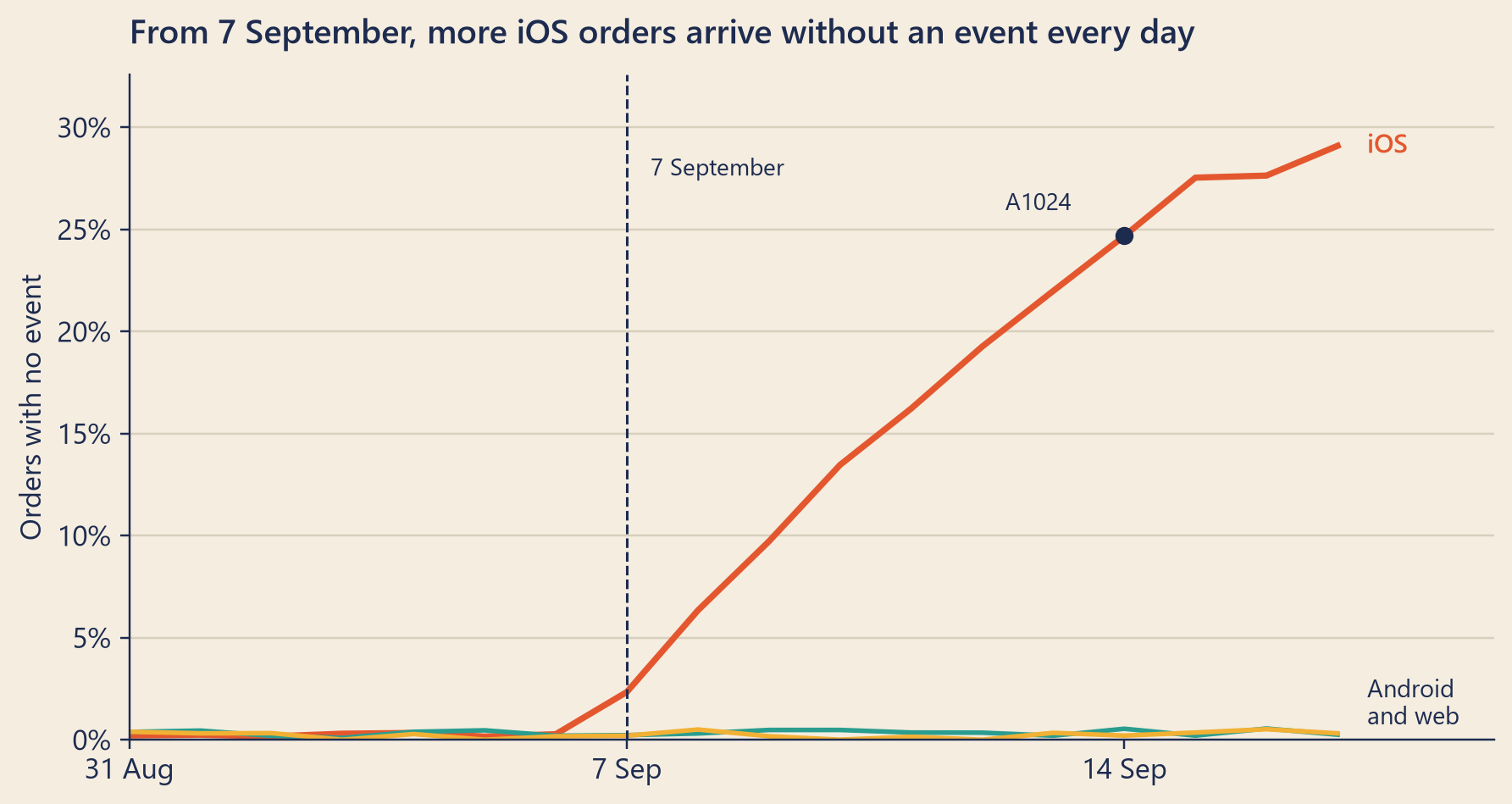
All of them were iOS orders. Mia ran the same match for every day from 31 August to 17 September, split by platform.
Figure 1: Share of each platform’s orders that have no order_completed event, by the day the order was placed (database time).
Before 7 September, every platform lost a few events, at the background rate. From that day on, iOS changed. On 7 September, 75 iOS orders had no event (2.3% of iOS orders). On 17 September, 1,105 did (29.1%). Android and web never went above 0.55% on any day. In total, from 7 September to 17 September, 7,412 of 69,182 orders had no event, and 98.7% of those were iOS orders.
An auditor tests both directions. Mia also ran the match the other way: order_completed events whose order_id is not in the database. There were zero. No event pointed to an order that does not exist. The gap runs one way only: real orders, with no event.
NoteUnder the hood
The anti-join, in symbols. Let \(O\) be the set of order IDs placed on one day, and \(E\) the set of order IDs that have an order_completed event on any day. The orders with no event are the set difference
\[O \setminus E = \{\, o \in O : o \notin E \,\}.\]
Every order is either matched or not, so \(|O| = |O \cap E| + |O \setminus E|\). On Mia’s Monday: 5,711 = 4,872 + 839. The other direction, \(E \setminus O\), was empty.
Three ways to write it in SQL.LEFT JOIN … WHERE r.order_id IS NULL (as above); WHERE NOT EXISTS (SELECT 1 FROM reported r WHERE r.order_id = o.order_id); and WHERE o.order_id NOT IN (SELECT order_id FROM …). The third one is a trap. If the inner query returns even one NULL, the test x NOT IN (…) is never true, so the query returns no rows at all. In Steep’s events, order_id is NULL on every event except order_completed: on Monday, on 47,042 of 51,927 events. Some engines also have a keyword for this join: DuckDB accepts ANTI JOIN, and Spark SQL accepts LEFT ANTI JOIN.
Replay, precisely. Sort the changes by (file, position). Files are numbered and positions grow inside a file, so this puts every change in commit order. The table at a point \(p\) in the log is: for each order_id, the after-image of its last change at or before \(p\); if that change is a delete, the row does not exist. steep.cdc.orders_as_of does exactly this, and the book’s tests check that a full replay equals the orders table. Starting from an empty table works only because this book’s saved log begins with the first order in its data. A real replay starts from a snapshot of the table (Debezium marks those rows with r) and applies the changes logged after the snapshot.
Row-based logging. MySQL can log the SQL statements themselves (statement-based) or the changed rows (row-based). Row-based logging is the default, and it is what CDC tools need. An update carries the row before and after the change (with the default binlog_row_image=FULL, the whole row). An insert carries only the after image, and a delete only the before image. One row event can hold many rows, and each transaction also writes other events around its rows, such as its start, a map of the table, and its commit. Every binlog file begins with a header event at byte 4, so a change is never stored there. This book’s binlog is simpler: one row per event, one file per day, and each day’s changes start at byte 4.
Retention. MySQL deletes binlog files after 30 days by default (binlog_expire_logs_seconds). A CDC tool that stops for longer than that cannot catch up from the log. It must take a fresh snapshot of the tables first. Anyone who wants the history for longer must store the changes somewhere else, as Steep does in cdc_orders_binlog.
Two older kinds of CDC.Query-based CDC asks the table every few minutes for rows whose updated_at has changed. It never sees a delete, and it misses the in-between state of a row that changed twice between two questions. Trigger-based CDC adds a small program to the database that copies every change into a second table. It sees everything, but it adds work to every write.
Debezium’s change events. Each one carries op (c, u, d, and r for rows read during the first full copy, the snapshot), the before and after images, and a source block that includes the binlog file and position. Insert events have no before; delete events have no after.
Try it
The browser holds four small files:
recon_daily: the daily reconciliation that Steep’s warehouse keeps (orders, and orders with an event, per day and segment);
orders: every order placed on Mia’s Monday, 5,711 rows;
events: the app’s events that arrived that Monday;
binlog: a sample of the saved binlog, with Mia’s order, 1,863 other orders, and the deletes.
Reconcile two sources. Pick a starting query, change it if you like, and press “Run query”.
srcDb = {try {returnawait DuckDBClient.of({recon_daily:FileAttachment("../data/out/web/recon_daily.parquet"),orders:FileAttachment("../data/out/web/orders_2026-09-14.parquet"),events:FileAttachment("../data/out/web/ods_events_2026-09-14.parquet"),binlog:FileAttachment("../data/out/web/cdc_orders_binlog_sample.parquet") }); } catch (error) {returnnull;// the readouts below explain what went wrong }}
Show the code
srcQueries = {const f = srcFacts;const h = f.hoursBehindUtc;const range =`BETWEEN DATE '${f.firstDay}' AND DATE '${f.lastDay}'`;returnnewMap([ ["Day by day: database vs app",`-- One row per day. 'orders' come from the orders database;-- 'with_event' counts those with an order_completed event.SELECT strftime(order_date, '%a %d %b') AS day, sum(orders) AS orders, sum(orders_with_event) AS with_event, sum(orders) - sum(orders_with_event) AS no_event, round(100 * (sum(orders) - sum(orders_with_event))::DOUBLE / sum(orders), 2) AS pct_no_eventFROM recon_dailyWHERE order_date ${range}GROUP BY order_dateORDER BY order_date;`], ["Split by platform",`-- Orders with no event, per day and platform.SELECT strftime(order_date, '%a %d %b') AS day, sum(missing_events) FILTER (WHERE platform = 'ios') AS ios, sum(missing_events) FILTER (WHERE platform = 'android') AS android, sum(missing_events) FILTER (WHERE platform = 'web') AS webFROM recon_dailyWHERE order_date ${range}GROUP BY order_dateORDER BY order_date;`], ["Match Monday's orders (left join)",`-- Every order placed on Monday, matched to the-- order_completed events that arrived that day.WITH reported AS ( SELECT DISTINCT order_id FROM events WHERE event_name = 'order_completed')SELECT o.order_id, o.pickup_code, o.store_id, strftime(o.created_at_local, '%H:%M:%S') AS placed_at, o.platform, r.order_id IS NOT NULL AS has_eventFROM orders AS oLEFT JOIN reported AS r ON r.order_id = o.order_idORDER BY o.created_at_local;`], ["Keep only the unmatched (anti-join)",`-- The same match, keeping only orders with no partner.WITH reported AS ( SELECT DISTINCT order_id FROM events WHERE event_name = 'order_completed')SELECT o.order_id, o.pickup_code, o.store_id, strftime(o.created_at_local, '%H:%M:%S') AS placed_at, o.platformFROM orders AS oLEFT JOIN reported AS r ON r.order_id = o.order_idWHERE r.order_id IS NULLORDER BY o.created_at_local;`], ["Count the unmatched, by platform",`-- The anti-join, counted.WITH reported AS ( SELECT DISTINCT order_id FROM events WHERE event_name = 'order_completed')SELECT o.platform, count(*) AS orders, count(*) FILTER (WHERE r.order_id IS NULL) AS no_eventFROM orders AS oLEFT JOIN reported AS r ON r.order_id = o.order_idGROUP BY o.platformORDER BY o.platform;`], ["The NOT IN trap",`-- The same question with NOT IN. It returns no rows. Why?-- (Hint: what is order_id on an app_open event?)SELECT order_idFROM ordersWHERE order_id NOT IN (SELECT order_id FROM events);`], ["Mia's phone that morning",`-- Her events: the phone's clock and the server's clock.SELECT event_name, strftime(event_time - INTERVAL ${h} HOUR, '%H:%M:%S') AS on_the_phone, strftime(ingest_time - INTERVAL ${h} HOUR, '%H:%M:%S') AS at_the_serverFROM eventsWHERE user_id = 'u000001'ORDER BY event_time;`] ]);}
srcResult = {if (srcDb ===null) return {rows: [],error:"The data files could not be loaded in this browser."};try {const rows =await srcDb.query(srcSql);return {rows:Array.from(rows, r => (typeof r.toJSON==="function"? r.toJSON() : r)),error:null}; } catch (e) {return {rows: [],error:String(e && e.message? e.message: e)}; }}
Show the code
{const note = text => htl.html`<p style="font-family:Inter,system-ui,sans-serif;font-size:0.85rem;color:#3d4766">${text}</p>`;if (srcResult.error) {return htl.html`<p style="color:#b8401c;font-family:Inter,system-ui,sans-serif;font-size:0.85rem">The query did not run: ${srcResult.error}</p>`; }if (srcResult.rows.length===0) returnnote("The query ran and returned no rows.");// Show values as written (order IDs are labels, so no thousands separators).const plain = v => (v ==null?"NULL": v instanceofDate? v.toISOString().slice(0,10) :String(v));const columns =Object.keys(srcResult.rows[0]);return Inputs.table(srcResult.rows, {rows:14,layout:"auto",format:Object.fromEntries(columns.map(c => [c, plain])) });}
Things to try:
Run “Day by day”, then “Split by platform”. Find the first day on which iOS leaves the background.
Run the left join for Monday. It shows every order and whether it has an order_completed event. Then run the anti-join: only the orders with no partner stay. Add the line AND o.store_id = 'HBR-01' after the WHERE line to see Mia’s store. Her order 4158971 is there.
Run “Count the unmatched, by platform”.
Run “The NOT IN trap”. It returns nothing, although the anti-join found orders. Read the hint.
Run “Mia’s phone that morning”. Compare the phone’s clock with the server’s.
In your browser, the anti-join finds 843 orders with no event, four more than Mia’s 839. The browser holds only the events that arrived on Monday. The events of those four late-evening orders arrived after midnight, so they sit in Tuesday’s file. Mia matched against the events of every day. (Chapter 14 is about events that arrive late.)
The second playground opens the binlog for one order at a time.
The binlog viewer. Pick an order. Each card is one entry in the binlog. Move the slider to replay the entries one by one, and watch the row in the table change.
logRows = {if (srcDb ===null) return [];const h = srcFacts.hoursBehindUtc;const rows =await srcDb.query(` SELECT binlog_file, binlog_pos, strftime(ts - INTERVAL ${h} HOUR, '%a %d %b %Y, %H:%M:%S') AS at, op, before.status AS b_status, CAST(before.net_amount AS DOUBLE) AS b_amount, after.status AS a_status, CAST(after.net_amount AS DOUBLE) AS a_amount FROM binlog WHERE order_id = ${Number(logPick)} ORDER BY binlog_file, binlog_pos`);returnArray.from(rows, r => (typeof r.toJSON==="function"? r.toJSON() : r));}
{const C = {teal:"#2a9d8f",tealText:"#1f7a6f",tomato:"#e4572e",tomatoText:"#b8401c",mustard:"#f2b134",ink:"#1d2b4f",muted:"#8a8f9e",deep:"#ebe2d0"};if (srcDb ===null|| logRows.length===0) {return htl.html`<p style="font-family:Inter,system-ui,sans-serif;font-size:0.85rem">The binlog could not be loaded in this browser.</p>`; }const kinds = {c: ["insert", C.teal],u: ["update", C.mustard],d: ["delete", C.tomato]};const money = v => (v ==null?"":"$"+Number(v).toFixed(2));const image = (s, a) => (s ==null? htl.html`<em>no row</em>`: htl.html`<strong>${s}</strong> ${money(a)}`);const step =Math.min(logStep, logRows.length);const cards = logRows.map((r, i) => {const [word, color] = kinds[r.op] || [r.op, C.muted];const done = i < step;return htl.html`<div class="bl-card" style="opacity:${done ?1:0.4}"> <div class="bl-head"><span class="bl-op" style="background:${color}">${r.op}</span> <span class="bl-word">${word}</span> <span class="bl-where">${r.binlog_file} · position ${String(r.binlog_pos)}</span></div> <div class="bl-time">${r.at} (Harbor time)</div> <div class="bl-images"><span>Before: ${image(r.b_status, r.b_amount)}</span> <span class="bl-arrow">→</span><span>After: ${image(r.a_status, r.a_amount)}</span></div> </div>`; });const last = step >0? logRows[step -1] :null;const state = last ===null? htl.html`The table has no row for order ${String(logPick)} yet.`: last.op==="d"? htl.html`The row was <strong>deleted</strong>. The table has no order ${String(logPick)}. Only the binlog remembers it.`: htl.html`Order ${String(logPick)} has status <strong>${last.a_status}</strong>, amount ${money(last.a_amount)}.`;const style = htl.html`<style> .bl-wrap { font-family: Inter, system-ui, sans-serif; color: ${C.ink}; } .bl-card { border: 1px solid rgba(29,43,79,0.18); border-radius: 6px; padding: 0.5rem 0.7rem; margin: 0.45rem 0; background: rgba(255,255,255,0.55); font-size: 0.84rem; } .bl-head { display: flex; flex-wrap: wrap; align-items: baseline; gap: 0.2rem 0.5rem; } .bl-op { display: inline-block; min-width: 1.5em; text-align: center; color: ${C.ink}; font-family: "JetBrains Mono", Consolas, monospace; font-weight: 600; border-radius: 4px; padding: 0 0.3em; } .bl-word { font-weight: 600; } .bl-where { color: #3d4766; font-family: "JetBrains Mono", Consolas, monospace; font-size: 0.78rem; overflow-wrap: anywhere; } .bl-time { color: #3d4766; margin: 0.15rem 0; } .bl-images { display: flex; flex-wrap: wrap; gap: 0.2rem 0.5rem; } .bl-arrow { color: ${C.muted}; } .bl-state { margin-top: 0.6rem; padding: 0.5rem 0.7rem; border-left: 4px solid ${C.teal}; background: ${C.deep}; border-radius: 4px; font-size: 0.9rem; } </style>`;return htl.html`<div class="bl-wrap">${style}${cards} <div class="bl-state" aria-live="polite">After ${step} of ${logRows.length} entries: ${state}</div></div>`;}
Things to try:
Mia’s order: two entries, an insert and an update. Set the slider to 1: for 26 minutes, the table said paid.
The cancelled order: the update goes from paid to cancelled.
The August order: a third entry arrives in October, weeks after the order and after this chapter’s Friday. Chapter 11 is about entries like this one.
The test order: replay both entries, and the row is gone.
Common traps
Counting money from events. Events are the best witness for behaviour and a weak one for money. Count orders and revenue from the system of record.
Trusting a name. The event order_completed and the status completed share a word and mean different moments. Read the tracking plan, or write one.
Matching on a label. By that Friday, the pickup code A1024 already matched 440 orders. Match on a key that both sources share, such as order_id.
Writing the anti-join with NOT IN. One NULL in the inner query, and the result is empty. Use NOT EXISTS or a left join with IS NULL.
Mixing clocks. An order placed late in the evening and an event that arrives after midnight can fall on different days. Match by key, not by date, then report by one agreed clock.
Reading a dump as history. A nightly copy shows the state at copy time. It cannot show what changed in between, or what was deleted.
TipAudit Instinct · Source documents and the book of record
Every entry in a ledger should rest on a source document: the first written record of a transaction, such as an invoice, a receipt or a bank statement. When records disagree, auditors trust outside evidence more than inside evidence. They trust inside evidence more when strong controls protect it.
Mia’s receipt was a source document. In the Prologue, she planned to trace it forward. Tonight she did: receipt, then database, then app events. The trail stopped at the third step. That is a completeness test: start from what happened, and check that the records caught all of it.
The reconciliation is the same test at scale. And like a good auditor, Mia ran it in both directions. Orders with no event test the completeness of the events. Events with no order test their occurrence: did everything that was recorded really happen? An auditor would go one step further and match the orders database to the payment provider’s settlement report, which is evidence from outside Steep.
NoteInterview Corner
Q1. Client-side or server-side tracking: what are the pros and cons?
NoteA short answer
Client-side events see everything the user does in the app, including taps and screens that never reach a server. But they travel far, so some are lost (offline phones, apps closed early, blocked scripts on the web), some arrive late or twice, and phone clocks can be wrong. Each platform has its own tracking code, and a fix needs a new app release, while old versions stay in use. Server-side events come from systems the company controls: they are more complete and easier to fix, but they cannot see what happens only on the device. A common design uses server-side events, or the database, for facts about money, and client-side events for behaviour, joined by shared keys such as order_id and session_id.
Q2. What is change data capture, and why use it instead of nightly dumps?
NoteA short answer
Log-based CDC reads the database’s own change log (in MySQL, the binlog; in PostgreSQL, the write-ahead log) and passes on every committed insert, update and delete, in commit order, usually within seconds. A nightly dump only shows the state at dump time: it misses changes in between and rows that were deleted, it is a day late, and scanning whole tables puts load on production. Query-based CDC (polling updated_at) also misses deletes and in-between states. CDC passes on every change; you keep the history only if you store those changes. Then you can replay them, from a snapshot, to rebuild the table at any past moment. The costs: more moving parts (a connector such as Debezium, often Kafka), handling schema changes, a first full snapshot, and a log that the source keeps for a limited time. If the connector falls further behind than that, it must start again from a new snapshot.
Q3. How would you design a tracking plan?
NoteA short answer
Start from the decisions the data must support, then list the events they need. For each event, write a name that follows one pattern, for example object then action (menu_viewed). Steep’s five names mix two patterns (app_open, but view_menu): a plan exists to stop that. Then write the exact moment it fires, its properties and their types, the keys that link it to other data (user_id, session_id, order_id), the platforms, and an owner. Version the plan. Test new app builds against it before release. Then monitor it in production: reconcile the events every day with the system of record, such as orders in the database, and alert when the match drops.
It was dark when Mia closed the last query. 7,412 orders since 7 September, nearly all of them iOS, and her own receipt among them. The orders were real. The money was real. Only the reports were missing.
She sent Theo a message: “Orders in the database with no order_completed event. Mine is one of them. Where could an event get lost between the phone and the warehouse?”
His answer came a few minutes later. “To our servers, then into Kafka, then into the warehouse. I am off on Monday. Tuesday, with your notebook.”
Mia drew three boxes on a new page: phone, Kafka, warehouse. Her phone’s events had reached the warehouse up to the checkout screen. An order_completed event had not. Somewhere between her tap on “Pay” and the warehouse, there was a hole.
Under the boxes she wrote one question: Did Kafka lose them?
Reported change: −12.0% orders, the week of 7 September compared with the week before (CEO dashboard).
Explained so far: 0 of the 12 points. About 7 of them sit between the orders database and the dashboard (Clue 1).
Suspects: measurement, somewhere between the tap on “Pay” and the warehouse. The iOS app, version 3.2.0 (Chapter 6); Mia’s own phone ran it. Not proved.
Ruled out: the matcha menu (Chapter 4).
Open questions: App events travel through Kafka. Did Kafka lose them? (Chapter 8.) Why iOS, and why from 7 September? (Chapter 15.)
New evidence: matched order by order, 7,412 orders placed from 7 September to 17 September have no order_completed event in the warehouse; 98.7% of them are iOS orders. In the week before, the loss was 0.26%, on every platform. No event points to an order that does not exist. Receipt A1024 is order 4158971: two binlog entries (paid at 08:47:21, completed at 09:13:21), four app events from her phone, and no order_completed.
Recap
Data has sources: the business database, server logs and app events. Each records a different moment, by a different clock, for a different purpose. For money, the business database is the book of record.
A table keeps only the current state. The database’s change log (the binlog) keeps every change, and change data capture streams it to other systems. Replaying it rebuilds the table.
To compare two sources, match them item by item with an anti-join, in both directions. Since 7 September, thousands of real orders, almost all from iOS, have no order_completed event.